Real estate website features: a checklist for agencies
Buyers judge an agency by its website. Here are the features it needs, from map search to inquiry emails, as a checklist you can tick, must-haves first.
In this guide
- Buyers need a map search, full listing pages and a fast way to reach an agent
- Put the agent's box, a short form and a call button on every listing
- Search pages with their own address and title can bring visitors from Google
- Backups, updates and few plugins keep the site fast and working
- Send yourself a test inquiry before launch, because site mail can land in spam
The real estate website features that matter most are a map search, full listing pages and a fast way to reach an agent. Next come search pages that Google can find and someone who keeps the site fast and updated.
This checklist is for agencies that show their own listings. Most of its 29 items link to our MyHome demo, a help guide or a deeper article. Our guide to creating a real estate website covers the build step by step.
The real estate website features checklist
Tick each feature your site already has
29 tasks
The must-have features of a real estate website come first in each group.
Search and map
-
The result count should change with no page reload.
See it on the demo -
Buyers often know the streets better than the area names.
How to add map search to a real estate website -
Keep the suggestions to the countries you serve, up to five.
Limiting Google Maps Autocomplete to Specific Countries on Your Website -
Buyers who move for a job often search around one address.
Understanding the Search Radius Feature -
Price, type and bedrooms up front, the rest one click away.
See it on the demo -
Nice to have. A couple can send each other the same homes.
Listing pages
-
MyHome offers three gallery styles, Mosaic, Gallery and Carousel.
What a property listing page needs to sell a home -
Type, beds, baths, size and year built. MyHome adds the price per square foot.
-
You place each new field once in search and once on the listing.
Types of Custom Fields for Property Listings -
Fields carry the numbers, and the text tells the story.
How to write a property listing description (with templates) -
A leaflet goes in as a PDF, a video as a YouTube link.
-
Nice to have. Buyers see a monthly payment from the price, the down payment and the rate.
See it on the demo
Agents and team
-
MyHome adds reviews and Call, WhatsApp and E-mail buttons.
See it on the demo -
Nice to have.
See it on the demo
Inquiries
-
Keep the form short, with a name, an email or phone and a message.
How to get more leads from your real estate website -
The agent box on the MyHome demo has phone, WhatsApp and Viber buttons.
-
An inquiry should not wait while one agent is away.
Sending email to multiple recipients (CC) -
If it lands in spam, send the site's mail through SMTP with a free plugin.
How to prevent emails go to SPAM folder? How to use SMTP? -
Sellers bring you the listings. Ask for the address, the type of home and a phone number.
Getting found on Google
-
For example /listings/for-sale/apartments/ instead of a long string of filters.
How to Customize URL Slugs for Search Results and Single Ad Pages -
MyHome does this on its SEO tab and works with the free Yoast SEO plugin.
Real estate SEO: how agencies get found on Google -
MyHome builds them from the fields you choose, such as offer type, then property type, and sets canonical tags from them.
How to Use Breadcrumbs and How Canonical URLs Work -
Each website runs in one language, and prices show in your own currency.
How to Translate or Rename All Texts -
Nice to have. The Waterfront demo has a ready community page.
See it on the demo
Speed and care
-
Use mobile data, not the office Wi-Fi. Photos and filters should answer without a wait.
Why is my WordPress site slow? Fixes for listing websites -
MyHome updates come for life, each in one click.
WordPress maintenance checklist for a listing website -
The MyHome help center recommends the free Cookie Notice plugin.
Cookie Notice for GDPR & CCPA -
MyHome bought from us comes with 12 months of Premium Support.
What Premium Support covers
What should a real estate website have first?
Buyers come to an agency website with three questions. Do you have a home I want, what is it like, and how do I reach you now? Three features answer them, and two more keep buyers coming.
A map search that follows every filter
Buyers usually start with a place, then a price. A good map search lets them narrow both in one view and shows how many homes are left after each step.
Maps run on Google Maps, which needs a Google key and may cost money on very busy websites. The setup is in how to add map search to a real estate website.
Listing pages that answer before buyers ask
Put the photos first, then the price, the key facts, the description, the map and the agent. In MyHome, you design this page once in Elementor, and every listing uses it.
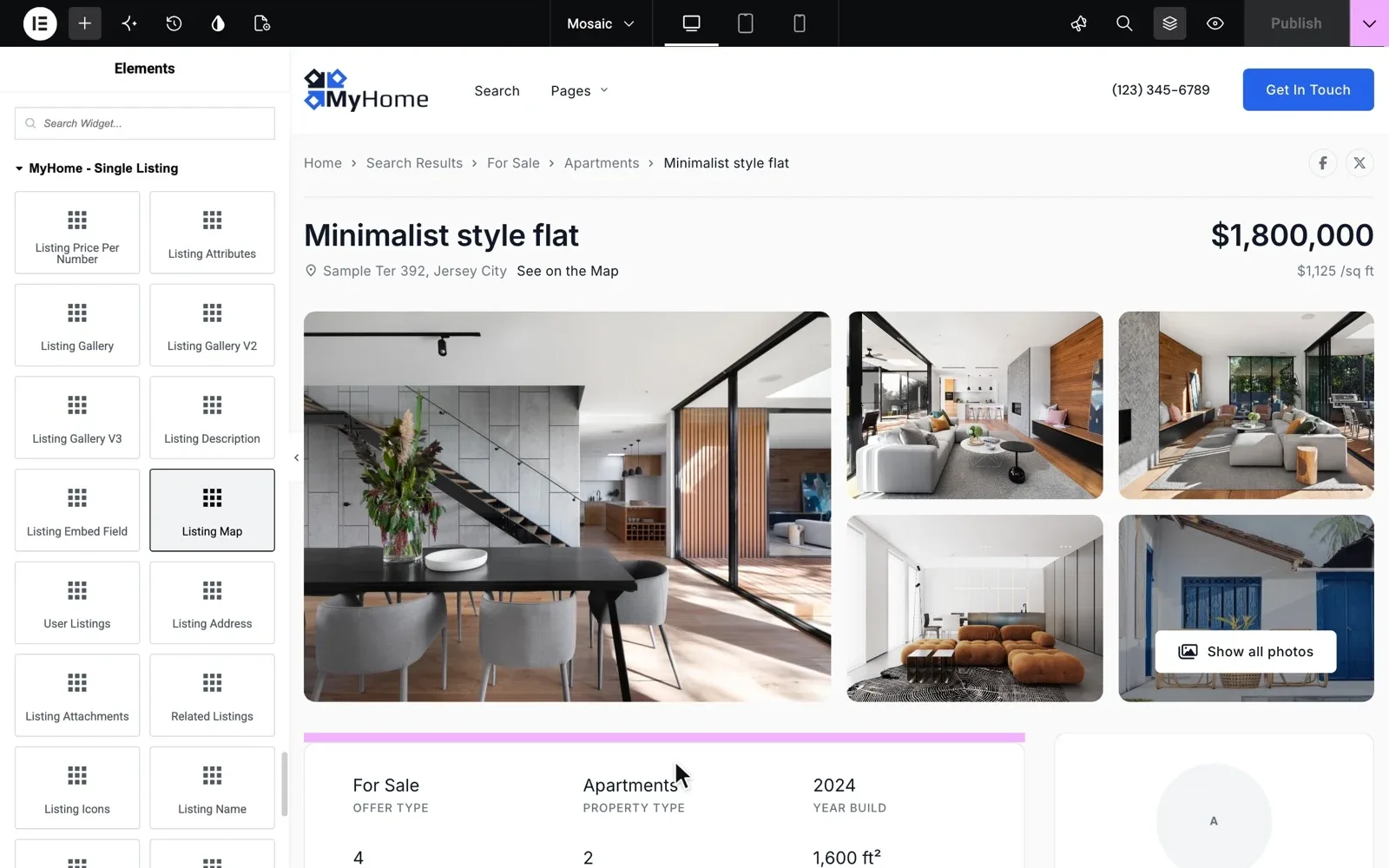
Each part of the page is explained in what a property listing page needs to sell a home. For the words, use our property listing description templates.
A way to reach an agent from every listing
An inquiry is lost when a buyer has to look for a phone number. Open any listing on a phone and count the taps it takes to reach an agent.
On the agent's page, a buyer sees who will answer the message. Fill it with a real photo and our real estate agent bio templates. More ways to win inquiries are in how to get more leads from your real estate website.
Add one of your own listings and see how it looks
A MyHome website with the design you pick and the full WordPress admin, ready in a minute.
Try MyHome free Free for 7 days. No card needed.Search pages that Google can find
Many buyers start on Google with a search such as apartments for sale in Brooklyn. A search page with its own address, title and H1 can show up for it. To check yours, filter by one area and one type, then read the web address and the title in the browser tab.
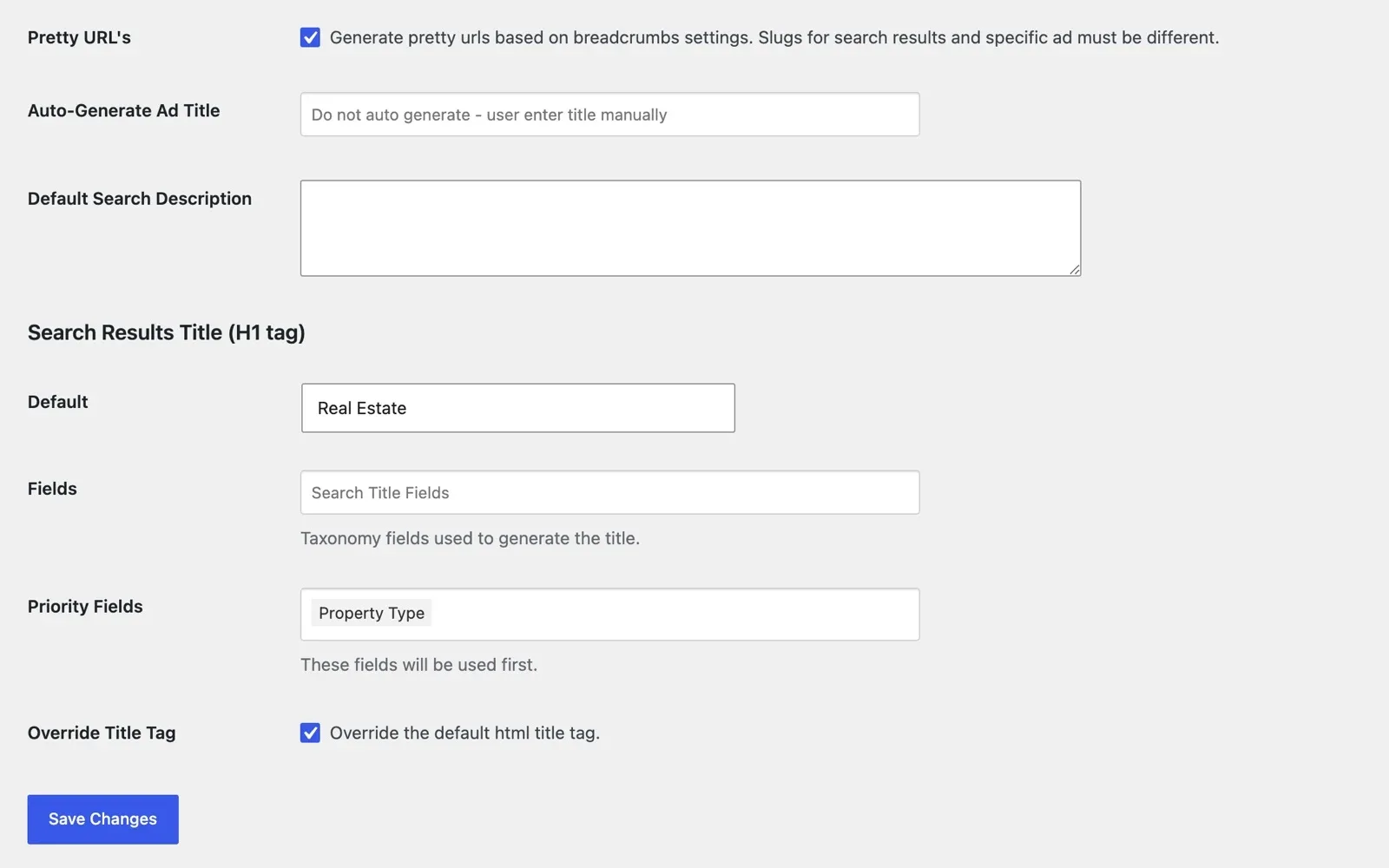
Our guide to real estate SEO shows how agencies get found, step by step.
Someone who keeps it fast and updated
An agency website is never finished. New listings go in every week, and WordPress, the theme and its plugins get updates.
MyHome needs only three plugins, so there is less to update and less that can break. Our guide to backing up a listing website shows how to keep the newest listings safe before each update.
Before you choose a theme
A demo shows the features, but your own listings show the fit. Look for your property types, your units and your currency, then check our real estate WordPress theme checklist. For high-end homes, read how to create a luxury real estate website.
Rather have us set it all up?
That is a long list on top of selling homes. The people who wrote MyHome can build your whole agency website, from the search to the agent pages.
Custom Website
Photos, your logo and a few words are enough. We design and write the whole website, and you pay only when you approve it.