How to get more leads from your real estate website
Many buyers look at a few agency websites before they write to one. Here is where real estate website leads are won or lost, and how to fix each place.
In this guide
- Put a short form and Call and WhatsApp buttons next to every listing
- Agent pages with a real photo, a bio and reviews earn trust
- Send site mail from a real mail account, so inquiries do not land in spam
- Answer every inquiry within the hour, because buyers often ask several agencies
- A website turns visitors into leads, but you still need visitors
Real estate website leads are won or lost between the first search and your reply. The search, the listing form, call and message buttons, agent pages, inquiry emails, your reply and fast pages all count. Fix each one, and the same visitors send you more inquiries.
A website does not create buyers on its own. It turns the visitors you already have into calls and messages. Getting more visitors is a separate job, covered at the end.
If your site is not built yet, start with how to create a real estate website with WordPress.
Where real estate website leads are won or lost
Follow one buyer through your site. At each step they either move closer to writing to you, or they leave for another agency's website.
| Step | What the buyer does | What must be there |
|---|---|---|
| Search | Picks a place and a price | A search they can share as a link |
| Listing | Looks at the photos and the facts | A short form next to the agent |
| Phone | Wants an answer now | Call and WhatsApp in one tap |
| Agent page | Checks who will answer | A real photo, a bio and reviews |
| Your reply | Waits, and often asks others too | An email that arrives, and a fast answer |
A real estate lead generation website is not a special product. It is an agency website where every step of the visit has a clear way to reach you.
Searches buyers can share
Buyers rarely choose a home alone. They send searches and listings to a partner, a parent or a friend, and that second person can write to you too.
In MyHome any search can be shared as a link that opens the same homes. Each listing also has share buttons for Facebook, Twitter, WhatsApp and Messenger.
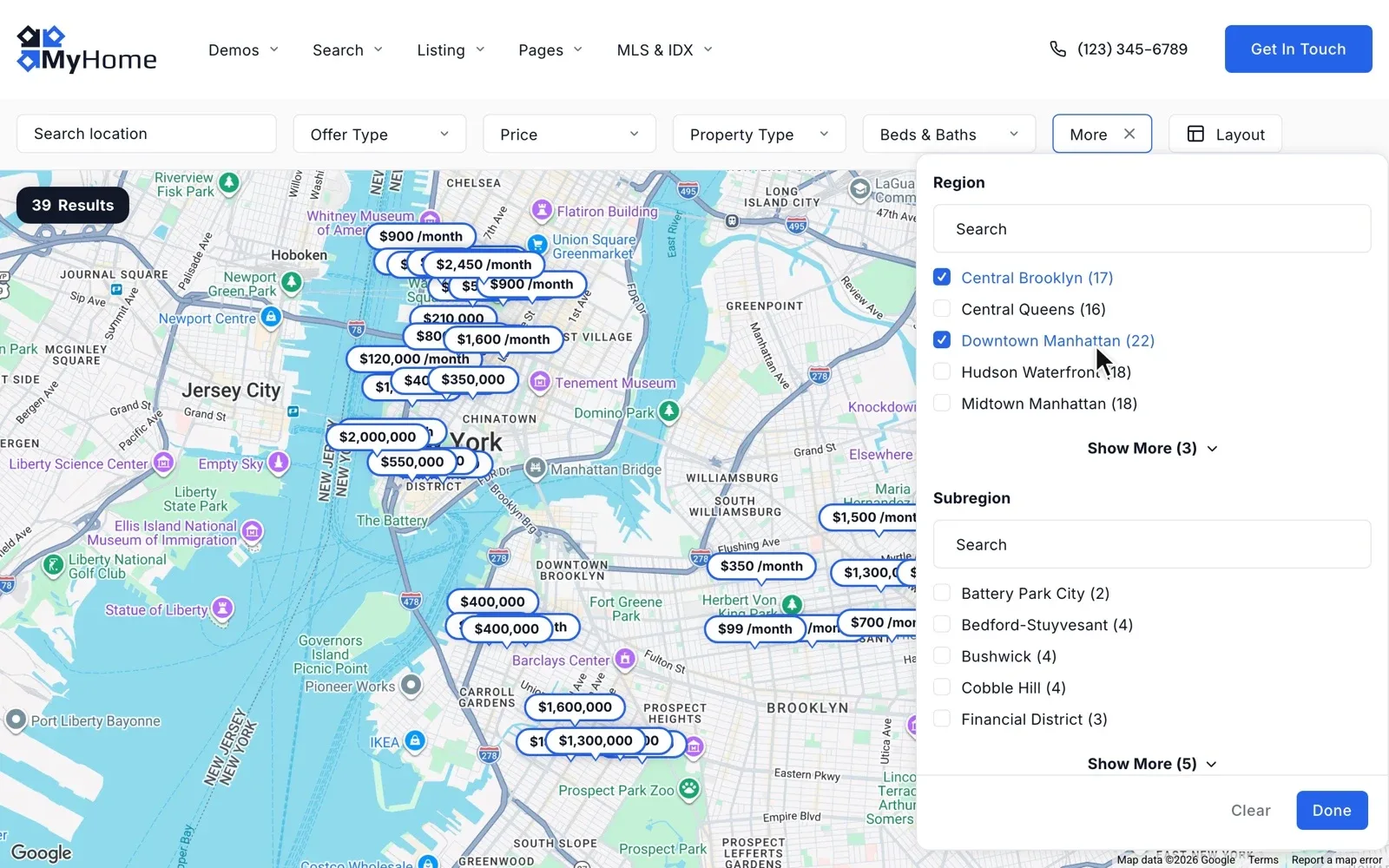
Buyers only ask about homes they find, so the search comes first. On MyHome the pins and the result count follow every filter, and buyers can draw the area they want. Our guide to real estate map search shows the setup.
A short form next to every listing
The property listing page is where most buyers decide to ask. Put the form right next to the agent's photo and phone, not under a long description. A buyer who has to scroll to find it often leaves instead.
Keep the form short, because every extra field costs you inquiries. These four are enough for a first message.
- A name
- An email, and a phone number that is not required
- A message, with a hint such as "When can I see it?"
- A privacy checkbox, where your local rules ask for one
MyHome puts a short contact form next to the agent on every listing. The forms run on Contact Form 7, where you edit their texts, the email they send and the thank-you message. The email can carry the listing's title, link and ID, so the agent knows which home the buyer means.
Call and message buttons for buyers on a phone
Many buyers look at listings on a phone, often between viewings. Typing a message there is slow, but one tap on Call or WhatsApp is not. Show both on every listing and every agent page.
On the MyHome demo, the agent box on a listing has phone, WhatsApp and Viber buttons. Every agent page has Call, WhatsApp and E-mail buttons, so a buyer never has to copy a number.
Agent pages that make buyers trust you
Before a buyer writes, many check who will answer. A real photo, a short bio and reviews from past clients make that first message easier to send.
- A real photo of the agent, not a logo
- The areas and the kinds of homes the agent knows best
- Homes sold or rented, only if the number is true
- Reviews from past clients
- Buttons to call, message or email the agent
MyHome gives every agent a page with a photo, a short bio, a star rating, their listings and their reviews. Listings sit under For Sale and For Rent tabs. A team page puts the whole team on one page, with the owner up front.
The bio does most of the talking, so write it for the buyer. Our guide on how to write a real estate agent bio has templates you can copy.
See the forms and agent pages on your own MyHome website
Get your own MyHome website with the demo you pick and the full WordPress admin, ready in a minute. Open a listing and see where buyers reach your agents.
Try MyHome free Free for 7 days. No card needed.Inquiry emails that arrive
A form that sends its emails to spam looks fine to the buyer, but the agent never sees the message. By default, WordPress sends mail in a way that often ends up in the spam folder.
The fix is to send your site's mail through SMTP, from a real mail account. For your live site, the MyHome Help Center recommends the free WP Mail SMTP plugin with a Gmail account. The guide How to prevent emails go to SPAM folder? How to use SMTP? shows each step.
Then send each inquiry to a second person, so no lead waits for one agent on holiday. In MyHome you add a CC line to the form's mail, and every inquiry goes to both addresses.
Reply to every inquiry within the hour
A buyer who writes to you often writes to other agencies the same day. The agency that answers first, and clearly, has the best chance to get the viewing. So agree on a reply time, such as within the hour during working time, and who answers when an agent is away.
Tell the buyer what happens next. In MyHome you edit the thank-you message shown after the form is sent, so it can say when an agent will reply. In the reply itself, answer the buyer's question first, then offer two viewing times.
Fast pages at every step
A slow page loses the buyer before they see the form. Large photos are a common cause, so resize them before you upload them, and keep the number of plugins low.
So easy to use, so light and fast to load. Best customer service. smjsweeper, verified MyHome customer
MyHome needs only 3 plugins, so there is less to update and less that can break. Search results change with no page reload. If your pages already feel slow, read why your listing website is slow, and how to fix it.
The real estate lead capture checklist
Go through this list at launch and every few months
16 tasks
Tick each item once it is done.
Listings and search
-
-
The agent then knows which home the buyer means.
Contact Form 7 – special mail tags -
Agents and phones
Emails
-
The help center recommends the free WP Mail SMTP plugin with a Gmail account.
How to prevent emails go to SPAM folder? How to use SMTP? -
Repeat it after every update and every change to a form.
Replies
-
-
-
A listing form, an agent page, a call or a shared link.
Speed and care
-
If a page feels slow, check the size of the photos first.
Why is my WordPress site slow? Fixes for listing websites
More leads also need more visitors
Everything above turns visitors into inquiries. To get more inquiries from your real estate website month after month, you also need more people on it.
Search pages that rank on Google bring buyers who already look in your area. Our guide to real estate SEO shows how agencies get found. Put your website's address in your email signature and on your social profiles too.
Rather not run the updates yourself?
An update can stop a form without anyone noticing. On Site Care, we back up your MyHome site and check it after every theme and WordPress update.
Site Care
The team that made your MyHome, Listivo or Vehica site keeps it backed up, updated and fast, with Premium Support included.