Real estate SEO: how agencies get found on Google
Buyers search Google for a kind of home in a place, not for your agency's name. Here is how your search pages, area pages and Google profile can show up.
In this guide
- Buyers search for a kind of home in a place, such as apartments for sale in Brooklyn
- Search pages with their own address, title and main heading (H1) can rank for those searches
- MyHome builds them from the filters and sets the canonical tags for you
- Area pages and listing titles that name the place add more ways in
- A Google Business Profile with real reviews puts your agency on the map
Real estate SEO is the work that gets your agency's pages onto Google when buyers look for homes. The pages that win searches like "apartments for sale in Brooklyn" have their own address, title and main heading (H1), and show homes that match.
So SEO for real estate agents is mostly about a few kinds of pages, plus a free Google Business Profile. If your site is not built yet, start with how to create a real estate website.
Which pages bring buyers from Google
| Page | What buyers search for | Example search |
|---|---|---|
| Home page | Your agency, or an agency in your town | real estate agency in Austin |
| Search page | A kind of home in a place | apartments for sale in Brooklyn |
| Area page | Life in a neighborhood | moving to Coral Gables |
| Listing page | One exact home | 3 bedroom house with pool in Coral Gables |
Your home page ranks for your agency's name and, with your town in its main heading, can also rank for an agency in that town. Big portals win the widest searches, but an agency can win the searches about its own towns and streets. Classifieds sites play the same game with category pages, as SEO for a classifieds website shows.
The real estate SEO checklist
For every other part of an agency site, use our real estate website features checklist.
Set up SEO on your agency website
22 tasks
The harder tasks are explained below the list.
Before launch
-
They can be renamed, not removed. Do it before Google learns your addresses.
How to Customize URL Slugs for Search Results and Single Ad Pages -
Each website runs in one language.
How to Translate or Rename All Texts -
-
Breadcrumbs are the trail of links on a listing page, such as For Sale, then Apartments. Canonical tags follow this setting.
How to Use Breadcrumbs and How Canonical URLs Work -
It sets the title and description of your home and area pages. Add it after the free trial, once the site is yours.
Search pages
-
-
-
-
Say what you sell, where, and for whom.
-
Link the clean address of each search, such as /listings/for-sale/apartments/.
Area pages
-
Five pages full of local detail beat fifty with only the name changed.
See it on the demo -
Links from other local websites help your area pages rank.
Listing pages
-
MyHome can also build titles from fields, and the web address follows the title.
How to Auto-Generate Ad Titles -
Copied text already stands on many other sites.
How to write a property listing description (with templates) -
Buyers then see what you have already sold.
Google Business Profile
-
Google's map results show agencies from these profiles.
-
-
Never pay or give gifts for reviews. Google's rules forbid it.
After launch
-
It is free, and Yoast SEO creates the sitemap for you.
-
Improve the pages that almost reach the first page of results.
-
MyHome updates come for life, each in one click.
WordPress maintenance checklist for a listing website
How to rank for homes for sale in your city
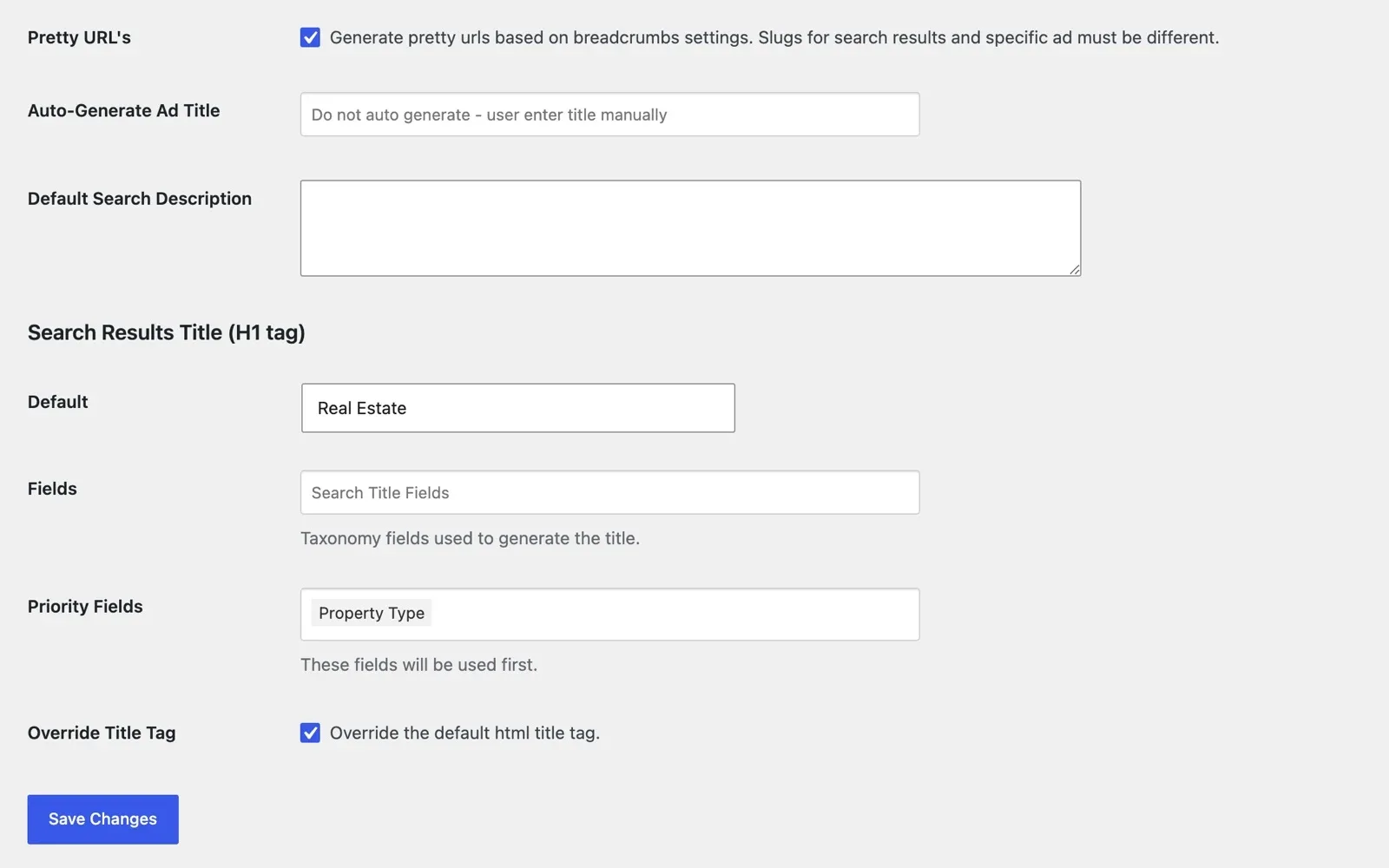
Set three things once, and every search page follows them. If you sell in one town, name it in the default H1 too.
Give each search page a clean address
On many sites, a search ends in a long address full of codes that buyers cannot read. MyHome turns the filters into a short address instead, such as /listings/for-sale/apartments/.
You choose the fields that build these addresses, and their order. Pick the two or three that buyers search by most, such as the offer type, then the property type.
Build the title and H1 from the filters
The title is the line Google shows as the link in its results, and the H1 is the main heading on the page. Both should say what the page holds.
On the MyHome SEO tab, you choose the fields that build the H1 and the priority fields that come first. Tick Override Title Tag, and the page title follows the filters too.
Let breadcrumbs set the canonical tags
Every filter a buyer adds, such as a price or beds, makes a new address for almost the same homes. Hundreds of near copies can leave Google unsure which page to show.
A canonical tag tells Google which address is the main one. MyHome sets these tags on its own, from your breadcrumbs setting.
Breadcrumbs also link your search pages to each other. On the demo, a listing shows the trail Home, Search Results, For Sale, Apartments, and each step after Home opens its search page.
Try the SEO tab on your own MyHome website
Get a real MyHome website with the demo you pick and the full WordPress admin, ready in a minute.
Try MyHome free Free for 7 days. No card needed.Write a page for each area you sell in
A search page lists homes but says little about the place. An area page adds your local knowledge, with the homes for sale below.
The MyHome Waterfront demo has a ready community page built this way, with life in the area first, then the homes for sale.
- The area's name in the title, the H1 and the web address
- Daily life there, written by an agent who knows it
- Schools, parks, shops and the time to the center
- The homes you have for sale there
- Your own photos, and the agent to call
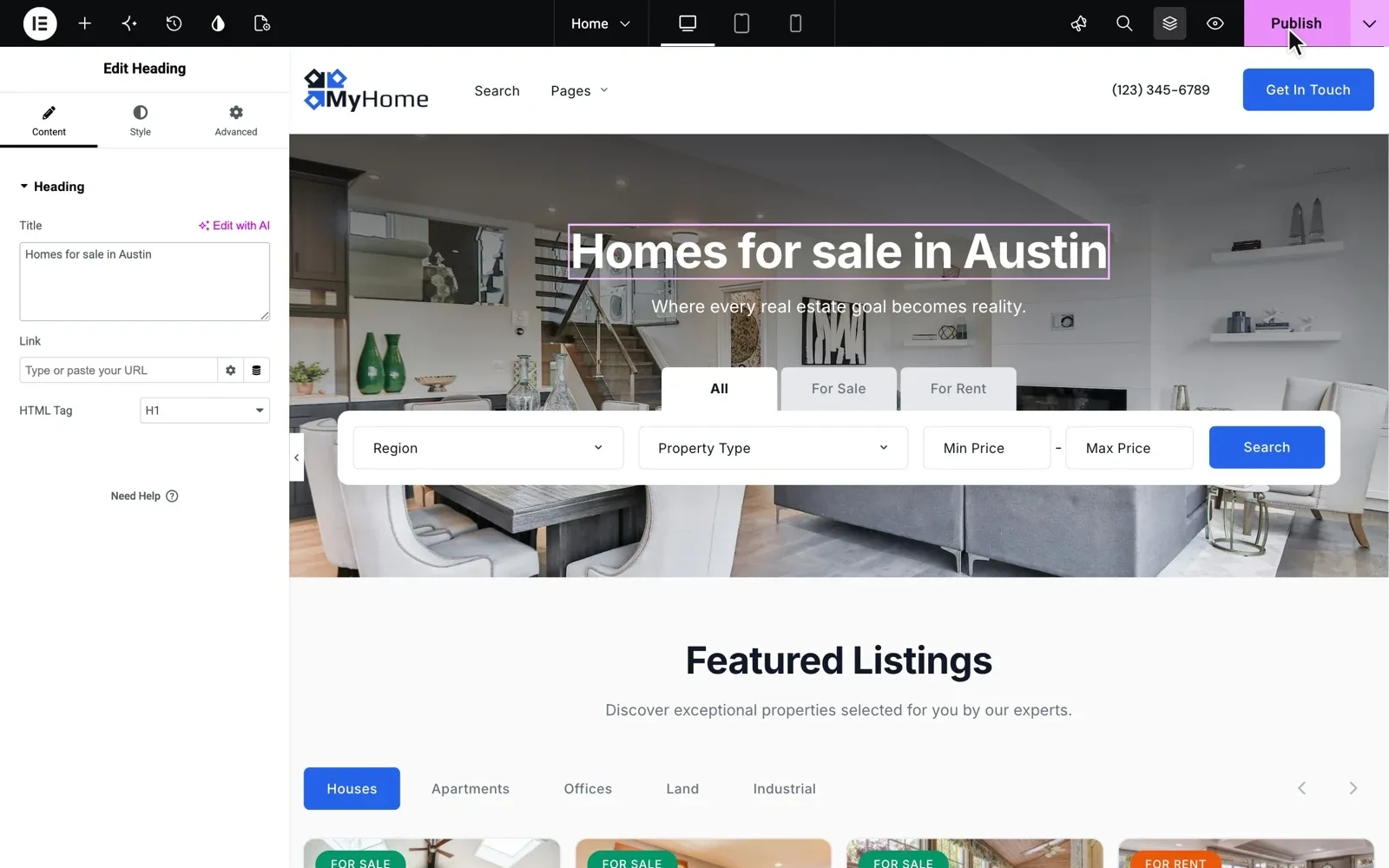
Every page opens in Elementor, so you write area pages without code. In the same editor, put your main town in the home page heading.
Give every listing a title buyers search for
A listing page answers the most exact searches. A title like "Your dream home!" tells buyers and Google nothing, so name the kind of home and the place.
| Weak title | Better title |
|---|---|
| Your dream home! | 3-bedroom house with a garden in Coral Gables |
| Must see, great price | 2-bedroom apartment for rent in Brickell |
| Investment opportunity | Office for sale near the metro in Lisbon |
Write titles like these yourself, or let MyHome build them from fields, such as Property Type and Location. When a home sells, switch it to Sold instead of deleting it, so its page and links keep working.
Local SEO for real estate starts with your Google profile
When someone searches for an agency near them, Google often shows a map with a few agencies first. Those agencies come from Google Business Profile. It is free, and you fill it in yourself.
- Real estate agency as the main category
- The towns you serve, your opening hours and your website
- Real photos of your office, your team and homes you sold
- A short post when a new home comes on the market
Google says the number and the score of your reviews help a profile rank. The best moment to ask is the day the sale closes, with the review link from your profile.
Reviews belong on your website too. Each MyHome agent page shows a star rating and reviews, next to the agent's listings.
Keep the site fast and working
Google prefers pages that work well on a phone, and buyers leave slow ones.
MyHome needs only three plugins, so there is less to update and less that can break.
So easy to use, so light and fast to load. Best customer service. smjsweeper, verified MyHome customer
Rankings bring buyers to the page. Turning them into calls is covered in how to get more leads from your real estate website.
Rather write area pages than run updates?
Site Care runs your MyHome website for you, so you can spend your time on listings, area pages and reviews.
Site Care
The team that made your MyHome, Listivo or Vehica site keeps it backed up, updated and fast, with Premium Support included.