Sending email to multiple recipients (CC)
Deliver every contact form submission to more than one inbox by adding Cc lines to the Additional headers of your Contact Form 7 form.
1 minute read
If you want a contact form to email several recipients, please follow these steps.
-
1
Edit the contact form
In the WordPress admin, go to Contact > Contact Forms and click Edit under the form you want to change.
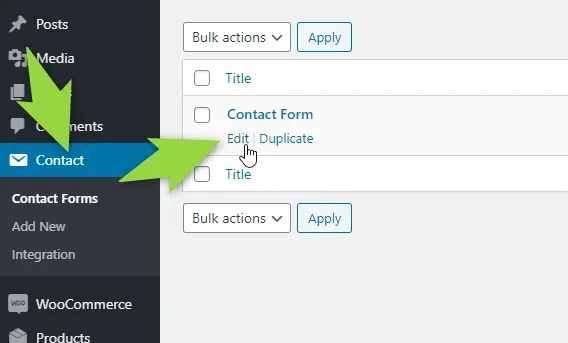
-
2
Add the extra addresses
On the Mail tab, keep your one main address in the To field, and add one line per extra recipient in Additional headers, next to the
Reply-Toline that is already there:Cc: address2@domain.comCc: address3@domain.com![The Mail tab of a Contact Form 7 form; green boxes highlight the To field holding a single address and the Additional headers box containing two Cc lines followed by Reply-To: [your-email]](https://assets.tangiblewp.com/media/1404/conversions/01KZXE3FB07N0D1Q0E6GE0N983-display-1600.webp)
-
3
Save the contact form
Click Save to store the new mail settings.

Now, whenever someone fills in the contact form, the email goes to all three addresses.
Ask the people who build MyHome
We answer by email from support@tangiblewp.com. With Premium Support, we also fix your site when something breaks.
We can also run your site for you, or build a new one.
Was this guide helpful?