Website launch checklist for a listing site
Thirty checks between a finished site and a live one, from your domain and emails to test ads, payments and backups. Tick them off as you go.
In this guide
- Connect your domain and send mail through SMTP, so every email arrives
- Publish a privacy policy, terms of use and a cookie notice where the law asks
- Post a test ad as a new user, and run one payment in test mode
- Add the Google Maps key, then open the site to Google on launch day
- Turn on nightly backups before the first real user signs up
A website launch checklist for a listing site goes further than pages and links. Strangers will sign up, post, pay and wait for emails, so each step needs a test before launch.
Work through the groups in order. Start the domain, mail and Google Maps steps early, because each one waits on another company.
Once you are live, the WordPress maintenance checklist takes over.
Not built yet? Pick the theme that fits
All three are free to try for 7 days, on a website of your own.
Real estate agencies and agents, with a contact form on every listing
Classifieds and directories, with payments and moderation built in
Car dealers and car marketplaces, with Stripe and PayPal built in
The website launch checklist, 30 checks before you go live
The first group fits any WordPress launch checklist. The other five add what a listing site needs, from mail and maps to test ads.
The new website checklist for a listing site
30 tasks
Six groups, in the order to do them, from your domain to launch day.
Domain and basics
-
On Site Care, you connect it in your account, and it always stays yours. On your own server, ask your server company.
-
Try the home page, a search and a listing. A warning scares new users away.
-
They show in browser tabs, and Google often uses them in its results.
-
WordPress sends important notices to the admin email. Never share your own login.
Emails that arrive
-
By default, WordPress mail often lands in spam. The help center shows the free WP Mail SMTP plugin.
How to prevent emails go to SPAM folder? How to use SMTP? -
Otherwise every email arrives from a sender called WordPress.
How to change WordPress Sender name -
Try a Gmail and an Outlook address, and look in the spam folder too.
-
On Listivo and Vehica, users get an email about new messages, so test that one too.
-
On Listivo, ad expiry and message emails run on WP-Cron, which waits for a visitor. On Site Care, ask us to set it up.
WP-Cron system
Legal pages and consent
-
WordPress gives you a page to start from in Settings > Privacy. The law where you work decides what it must say.
-
Say what may not be posted, how long ads stay live and when you remove them.
-
The help center recommends the free Cookie Notice plugin.
Cookie Notice for GDPR & CCPA -
On Listivo, the consent line above the Register button takes your own text and link.
Customizing Policy Label and Privacy Policy Link
Maps and payments
-
Maps and address suggestions need it. Google gives free use up to a monthly limit, and most sites stay inside it.
Map Integration Overview: Learn About Options -
Then nobody else can use your key on another website.
-
No suggestions? The key is missing, or one of its Google map services is switched off.
-
Stripe has a test mode, and the PayPal settings in Vehica have a sandbox box. Never launch with test keys.
Monetization – WooCommerce Payments Gateways -
It proves that the money really reaches your account.
Monetization Systems – PayPal, Stripe and WooCommerce Payments Gateways
Test ads and clean-up
-
Each category can ask for its own details, so try your two busiest ones.
-
Listivo and Vehica can hold each new ad until you approve it.
Moderation: How it Works and How to Enable or Disable It -
reCAPTCHA v3 stops bots without a puzzle for people. Listivo and Vehica both have it.
Google Recaptcha in the Listivo Theme -
On Listivo, Remove Not Used Content does it in one go. Delete your test ads and test accounts too.
Listivo Panel - dashboard -
Search your pages for lorem ipsum. On Vehica, the “Check our new app” box is demo content, not a feature.
How to customize / remove the “Check our new app” ad on the inventory page
Google, speed and backups
-
Sites are often built with it ticked. Left that way, Google keeps them out of search.
-
MyHome, Listivo and Vehica work with the free Yoast SEO plugin.
How to Optimize Search Results Page for SEO: H1 Tags, Descriptions, and Meta Details -
Yoast SEO builds the sitemap. Search Console then shows which pages Google cannot open.
-
The numbers show which channel brings users. Analytics cookies often need consent, so name them in your notice.
-
Keep the user panel and the login pages out of the cache.
Why is my WordPress site slow? Fixes for listing websites -
The help center shows UpdraftPlus, with copies in Dropbox or Google Drive. On Site Care, we take daily backups for you.
How to create Backup?
Five launch checks that take longer
Most checks take minutes. These five decide whether your first users stay.
Make sure every email arrives
A listing site runs on email. When a confirmation or a message alert lands in spam, the user thinks your site is broken and leaves.
By default, WordPress sends mail straight from the server, and spam filters often stop it. Send it through SMTP with a real mail account, then test these emails in two inboxes.
- The sign-up confirmation
- The password reset
- The alert about a new message
- The email that says an ad was approved or declined
- The contact form, sent to your own inbox
Post a test ad as a brand-new user
Before launching a website where strangers post, test it as a stranger. Log out, open a private window and sign up with a new email address.
Then post an ad on your phone, with photos, in your busiest category. Wherever you stop to think, a real user stops too.
Running an agency site on MyHome? Send an inquiry from a listing instead, and check that it reaches the right agent.
Test payments before real users pay
On Listivo and Vehica, users pay for packages at checkout. Run the whole purchase in test mode first, the way a user would.
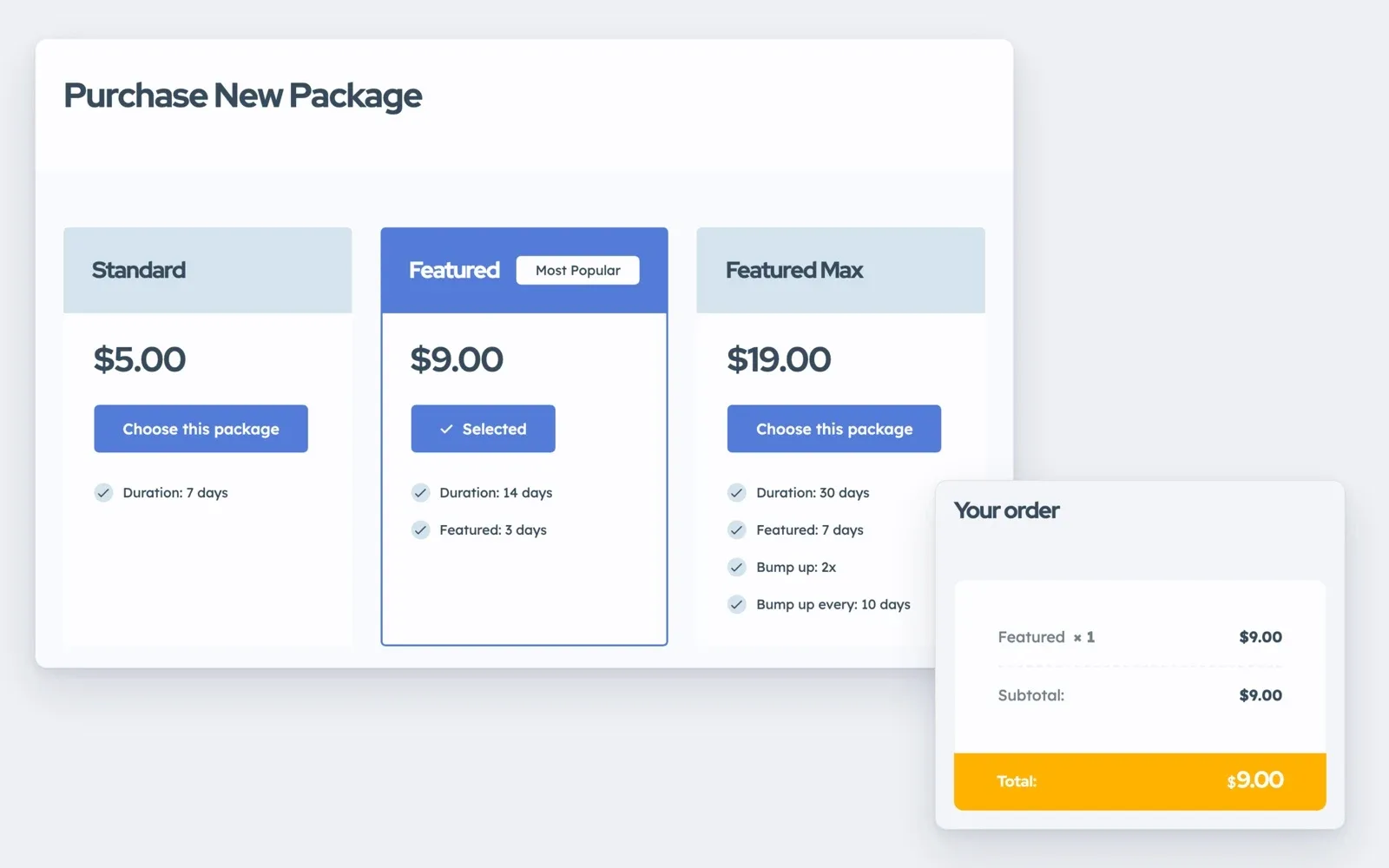
Then switch to your live keys and buy your cheapest package with a real card. Refund it in your payment account, and you know the money arrives.
Bought your theme from us? For 12 months, Premium Support gives advice on maps, payments and email, and fixes what breaks on your site.
Build and test your listing site before you launch it
Your own MyHome, Listivo or Vehica website, ready in a minute with the demo you pick and the full WordPress admin.
Try a theme free Free for 7 days. No card needed.Add the maps key, and lock it to your domain
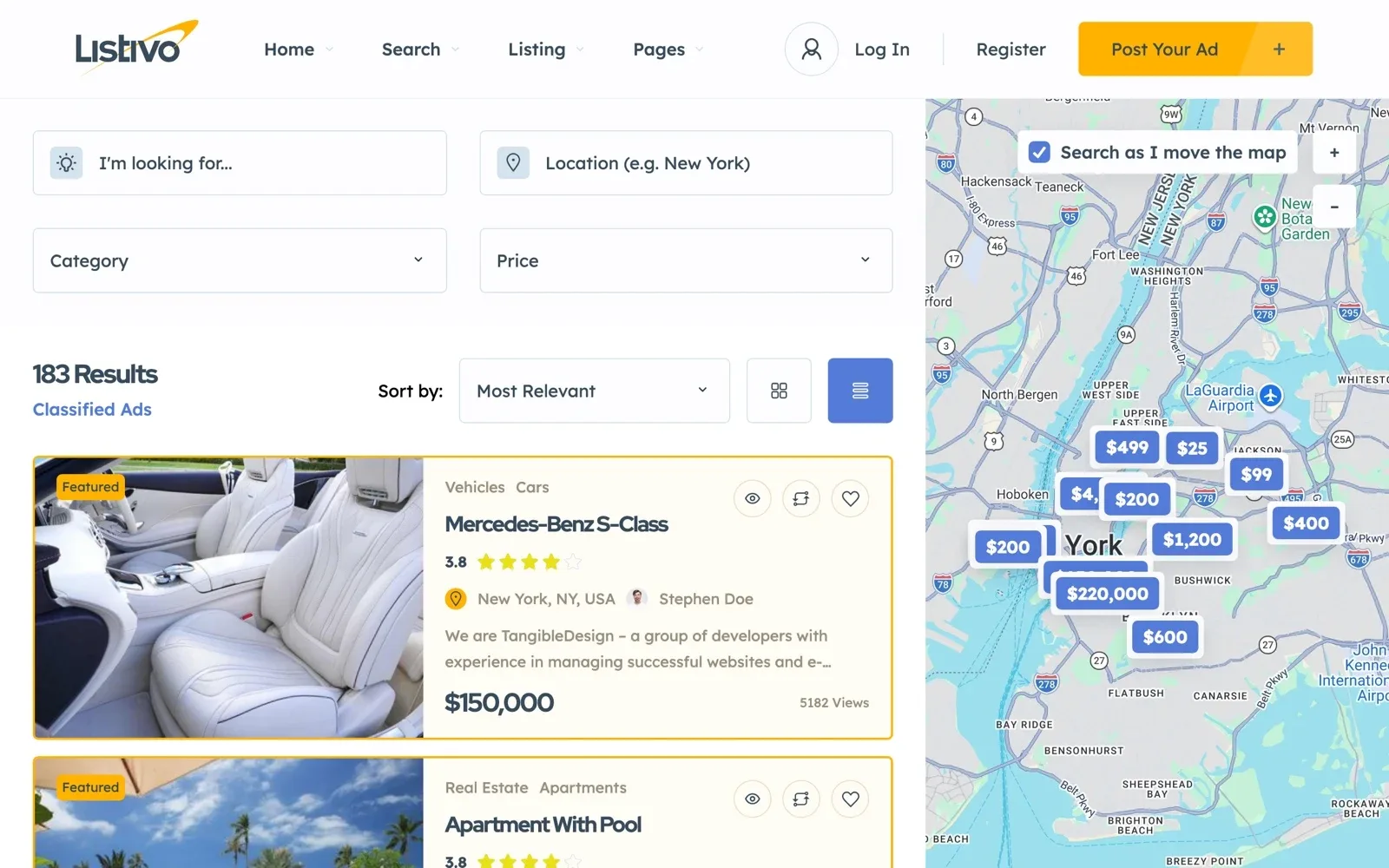
Map search and address suggestions run on Google Maps, which needs your own key and a billing account. Set a budget alert in that billing account, so a busy month never surprises you.
On Listivo, the map can run on the free OpenStreetMap, but address suggestions still need the Google key. Limit the key to your domain, then test an address.
Open the site to Google on purpose
Untick “Discourage search engines from indexing this site” in Settings > Reading only after the demo ads and texts are gone. Otherwise Google can list demo pages under your name.
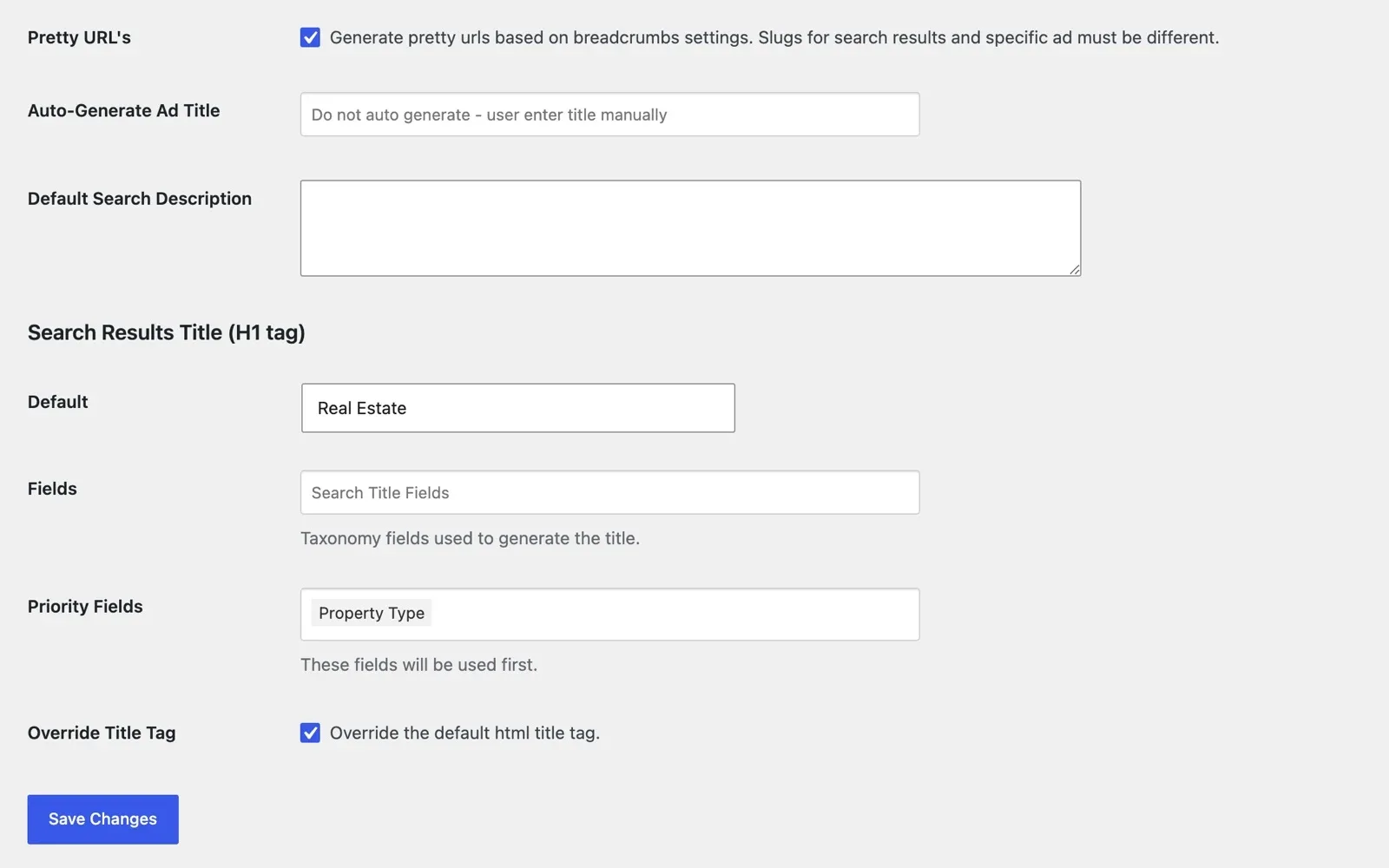
Then give each category search page its own title and description. A page for “used cars in Austin” matches what people type into Google.
What to do in the first week after launch
In the first week, do these five things every day.
- Approve new ads within hours, not days
- Answer every message and inquiry the same day
- Look at new sign-ups for bots and fake accounts
- Check that the nightly backup finished
- Ask your first users what was hard
An empty site gets few visitors, and few visitors post few ads. Our guide on how to get the first ads on a new classifieds website has a plan, week by week.
Rather have us run the site after launch?
On Site Care, you connect your domain in your account. We run the daily backups and the theme and WordPress updates, so your time goes to users and ads.
Site Care
The team that made your MyHome, Listivo or Vehica site keeps it backed up, updated and fast, with Premium Support included.