How to Customize URL Slugs for Search Results and Single Ad Pages
Rename the /listing/ and /listings/ segments that MyHome puts in your search and listing URLs, and understand which parts of the URL structure are fixed.
2 minute read
Customizing URL slugs is important for optimizing your website for user experience and search engine ranking. In MyHome, you can tailor the URL structures for the Search Results Page and the Single Listing Page.
Renaming URL parts for search and ad pages
In MyHome, the default URL structure for the Search Ad Results Page might look like domain.com/listings/ or, for specific categories of ads, domain.com/listings/field-a/field-b/. For a Single Ad Page, it might look like domain.com/listing/listing-name/.
/listings/ and /listing/ segments can be customized easily but cannot be removed. WordPress requires each custom post type to be in a separate folder to avoid slug conflicts between different types of custom post types, and main links like domain.com/name are reserved for pages and posts only, so these parts are necessary.Here's how you can rename the default /listing/ or /listings/ slug:
-
1
Open the MyHome Panel
Go to the MyHome Panel in the WordPress admin sidebar of your website.
-
2
Go to Translate/Rename
Click Translate/Rename, then open the Slugs tab.
-
3
Enter your URL parts
Find the Slugs section and enter the text you want for each URL part.
-
4
Save your changes
Click Save Changes to apply the new URL structure.
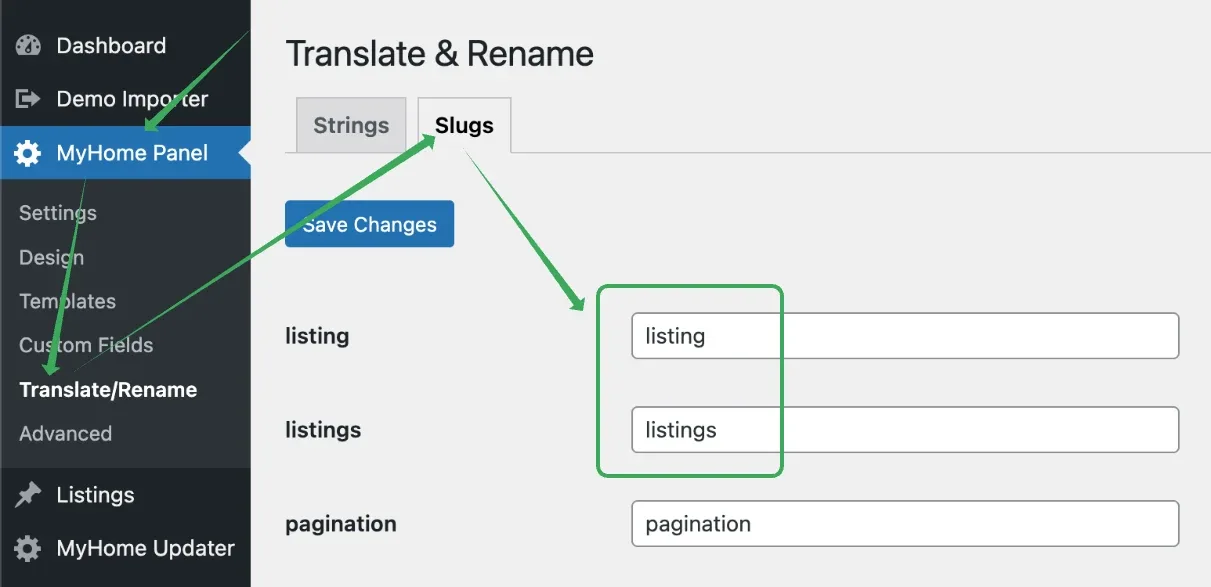
This customization allows you to make your URLs more descriptive and relevant to your content, which can improve both user experience and SEO.
Customizing Search Results Page Links
If you need to customize the search results page links to include specific fields, you should refer to our article about Breadcrumbs. This resource provides detailed instructions on how to implement these changes effectively.
Limitations on Custom Fields for Single Ad Page URLs
Currently, MyHome does not support using custom fields to create URLs for Single Ad Pages in the format /listings/field-a/ad-name/. The URL structure must follow the format /listing/listing-name/.
If you require more detailed URL structures that include multiple fields, consider using the Auto Generate Title option. This feature allows you to create titles that incorporate various fields, resulting in URLs like /listing/field-a-field-b-field-c/. This approach ensures that your URLs are still informative and can potentially enhance SEO by including relevant keywords.
Ask the people who build MyHome
We answer by email from support@tangiblewp.com. With Premium Support, we also fix your site when something breaks.
We can also run your site for you, or build a new one.
Was this guide helpful?