Car dealer website features checklist: what buyers expect
Car buyers expect make and model search, a page for every car, the monthly payment and WhatsApp. Tick each feature and see most of them on a live demo.
In this guide
- Launch with five of the 30 items and add the rest later
- Phone, WhatsApp and a message form belong on every car page
- Mark sold cars the day they go
- Fast pages and readable search addresses help buyers find you on Google
- Vehica has the search, car pages and loan calculator built in
The car dealer website features buyers expect are simple. They find a car by make and model, see photos and the price, check the monthly payment and reach you by phone or WhatsApp. Sold cars are marked, and every page loads fast on a phone.
This checklist has 30 items in six groups, most with a link to the Vehica demo, a help guide or a deeper article. For the build step by step, read our guide to creating a car dealer website.
The car dealer website features checklist
Tick each item once your site has it or you have tried it on the demo. A few items need an extra plugin, which you add after you buy Vehica or keep your trial site.
From search to running the site
30 tasks
Search
-
Pick BMW, and only BMW models stay in the Model list.
Parent Field – how to build relation Make > Model e.g. BMW > M4 -
Buyers stop clicking into makes you do not have.
How to set up a car make and model list on your website -
On the demo, Audi and then e-tron narrow 83 cars to 3.
See it on the demo -
Gearbox, color, doors and the year range sit one click away. You choose the fields and their order.
-
On the demo, All 83 splits into New 25 and Used 58.
-
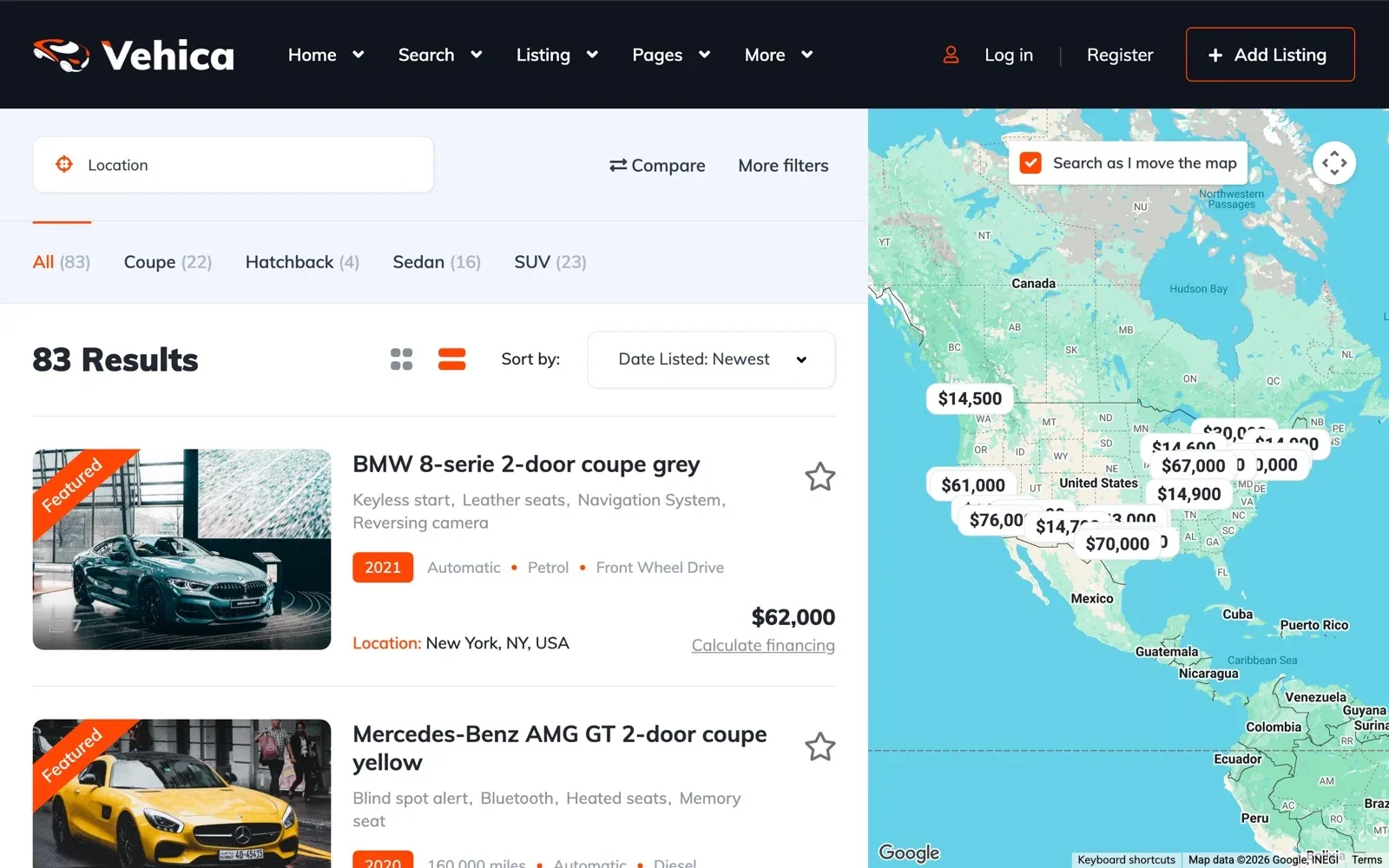
The map runs on Google Maps and needs your own Google key with a billing account.
How to setup map search in Vehica
Car pages
-
You design this page once in Elementor, and every car uses it.
How to Edit Single Listing Page? -
Outside first, then seats, dashboard, trunk and any damage. Buyers compare cars faster when every gallery runs the same way.
-
The fields carry the facts. The text says who the car suits and why.
How to write a car listing description (with templates) -
A new field shows on the car form right away. You place it on the car page in Elementor.
Custom Fields overview + how to add new field on single / inventory page -
The VIN is a plain text field on the car page and under More filters.
-
Price, condition, year and every spec line up. Vehica compares up to four cars.
Stock
-
Save it as a CSV file and load it with the free WP All Import plugin. Photos come in from the photo links in the file.
How to import car inventory to your website from an Excel sheet -
You name the labels yourself, such as Sold and Reserved, and give each one a color.
Sold / Pending / Active option -
Or show them on a Sold page, as the demo does.
See it on the demo -
One checkbox per car. With the Relevant sort, featured cars show first.
Price and monthly payment
-
Buyers skip cars with no price. Vehica can show your own text in place of a price when you need it.
-
Set the sign, its place and the number format once. Cards and the loan calculator follow.
How to change currency and price format? -
You set the starting rate, the months and the down payment.
How to add a car loan calculator to your dealer website -
One click opens the loan calculator for that car.
How to customize Loan Calculator?
Calls, WhatsApp and messages
-
The phone number shows in part, and in full on a click.
See it on the demo -
Email alerts bring you and the buyer back to reply.
Private Message System – how it works -
Put the phone and email in a bar above the menu, and the address and hours in the footer.
How to add menu top bar (phone number / email address above menu) -
Buyer messages then reach your inbox.
How to prevent emails go to SPAM folder? How to use SMTP ?
Brand, Google and running the site
-
Pick one of the seven home page layouts in the demo, then change any page in Elementor.
Car dealer website design ideas: 7 home page layouts -
Vehica works with Yoast SEO, which builds the sitemap for you.
-
A page for one make and model gives Google a clear address to show.
-
The help center shows a tested setup with the free W3 Total Cache. Vehica already makes smaller photo sizes for phones.
Speed Improvement – How to configure Cache (W3Total Cache) -
Most dealers never touch code. If a developer changes the theme, a child theme keeps that change safe in updates.
WordPress maintenance checklist for a listing website -
What you need depends on the rules of your country.
Cookie Notice for GDPR & CCPA
What should a car dealer website have first?
A buyer on a dealer website wants three answers fast. Is the car here, can I afford it, and can I talk to someone now? The five items below answer them, so build them first.
Search by make and model, with a count on every choice
Most buyers arrive with a make and a model in mind. When they pick a make, the Model list shows only that make's models. A count next to each make and model shows where you have cars.
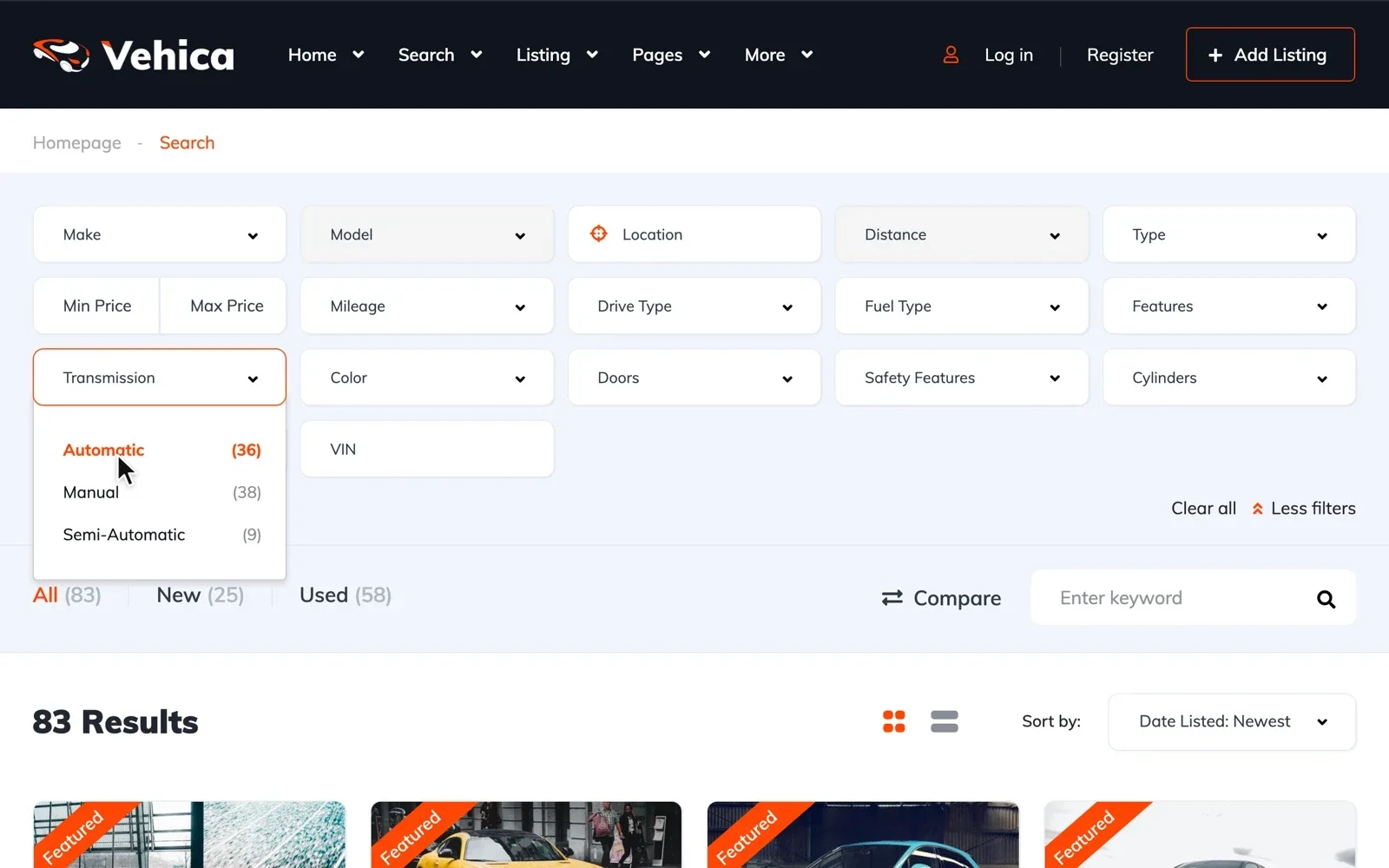
Load only the makes and models you sell, not every car ever built. Our guide to a car make and model list shows how to paste yours in one go.
A car page that answers before the buyer calls
The car page is where a buyer decides to call. Put the photos first, then the price, key specs, monthly payment and contact buttons.
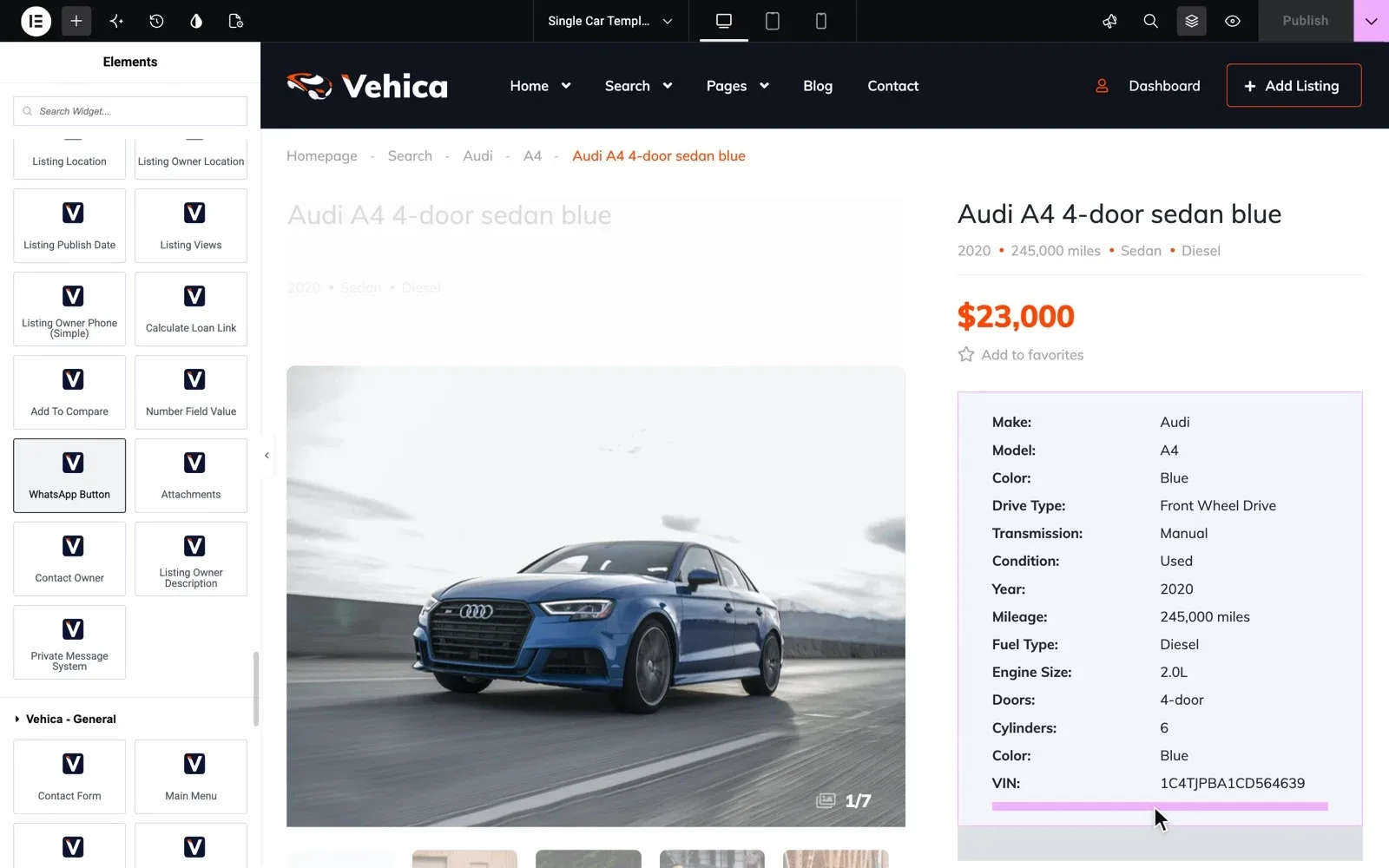
Then open one car on your phone. The first screen should show a big photo, the price, the year and the kilometers. For the words under the photos, use our car listing description templates.
The monthly payment next to the price
Many buyers think in monthly payments, not in the full price. Vehica puts a loan calculator on every car page, with the car's price filled in.
Set the starting rate close to what your finance partner really offers. Say next to the calculator that the result is an example, not a loan offer. Our guide on how to add a car loan calculator to your dealer website shows the settings.
Test the search, car pages and loan calculator yourself
Your own Vehica website with the demo in place and the full WordPress admin, ready in a minute.
Try Vehica free Free for 7 days. No card needed.Call, WhatsApp or write from the car page
Buyers on a phone want to reach you fast, in the way they like best. Put a phone button, a WhatsApp button and a message form on every car page.
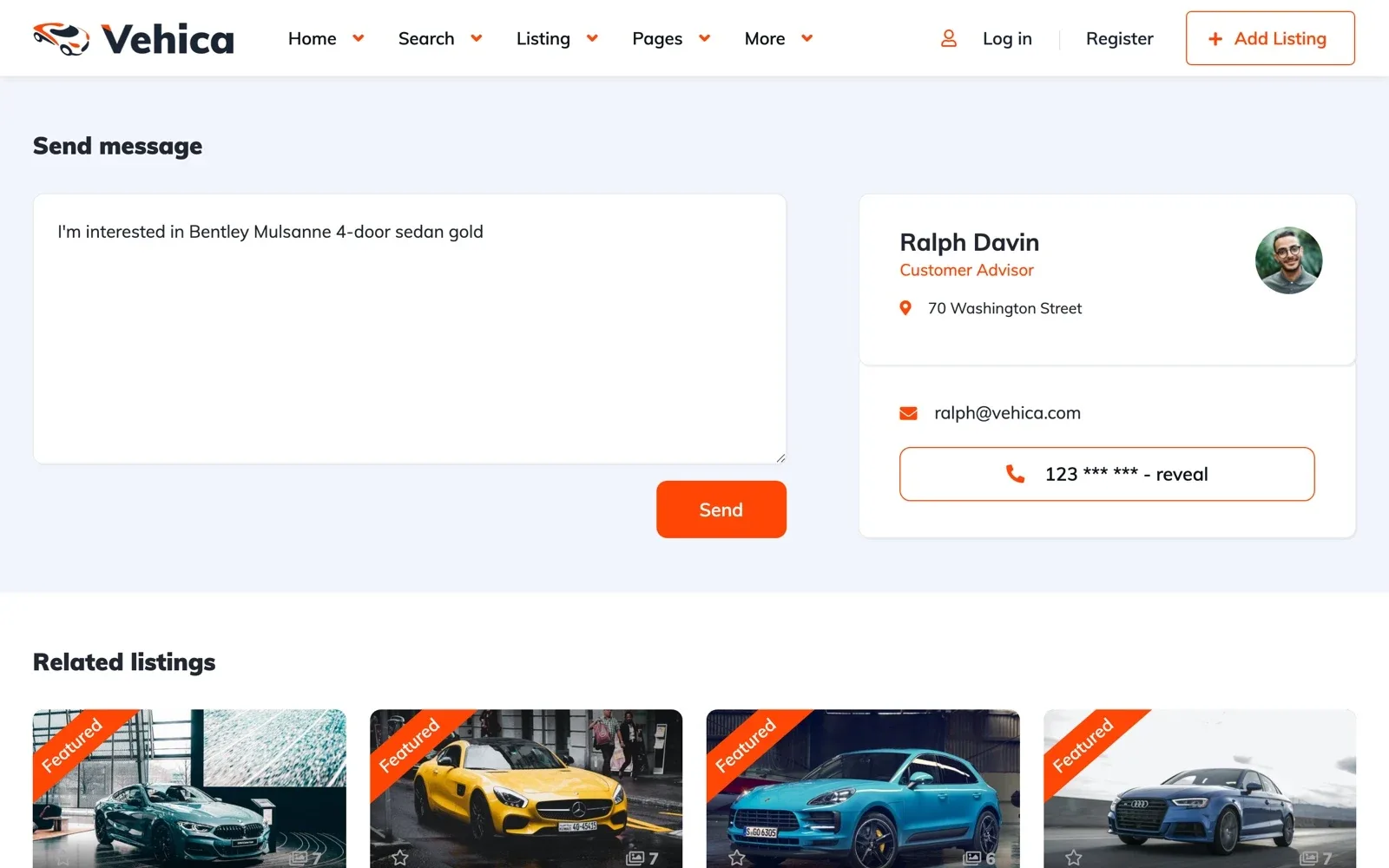
Messages stay in one thread in your panel, and email alerts tell you when a buyer writes. Answer the same day, because buyers often ask several dealers.
A stock list that is never out of date
Few things lose a buyer faster than a call about a car that sold last week. Mark it Sold or Reserved the day it goes. If it is also on a portal, take it off there the same day.
Is your stock in a spreadsheet? Our guide to putting your car stock online from an Excel sheet shows how to load it.
Dealer website must haves, and what can wait
You do not need all 30 items on day one. Launch with the search, car pages, the monthly payment, the contact buttons and a current stock list. Compare, map search and a blog can follow, and our launch checklist for a listing website covers the last checks.
Running a small lot on your own? Read how to create a used car dealer website next.
Rather have us build it for you?
Thirty items take time you would rather spend selling cars. The team that made Vehica can build the whole dealer website for you.
Custom Website
Photos, your logo and a few words are enough. We design and write the whole website, and you pay only when you approve it.