How to add a car loan calculator to your dealer website
Show buyers what each car costs per month, from a calculator page, every car page and your search results. Here is how to set it up and what to write next to it.
In this guide
- Give the calculator its own page and link to it from every car and every result
- Vehica can do all three and fills in each car's price
- You set the starting rate, months and down payment
- Fine print keeps the payment an honest estimate
- A rate that changes with the months needs a small code snippet
A car loan calculator for a dealer website shows buyers the monthly payment before they call you. Put it on a page of its own and link every car page to it, with the car's price filled in. Then show a Calculate financing link under each car in your search results.
Vehica, our WordPress theme for car dealers, can do all three. Below are the setup, the words to put next to the calculator and the math behind the payment. It is one step of building a car dealer website.
What a car loan calculator for a dealer website should do
Many buyers choose a car by the monthly payment, not by the full price. Without a calculator, they may open an auto loan calculator website, often a bank's, and leave your car behind.
A good monthly payment calculator for a car does six things. It is also one item of our car dealer website checklist.
- Starts with the car's price filled in
- Lets the buyer change the rate, months and down payment
- Shows the monthly payment, total interest and total paid
- Uses your currency and your buyers' words
- Calls the result an estimate, not a loan offer
- Keeps a call, WhatsApp or message button close by
1. Give the loan calculator a page of its own
The Vehica demo has a loan calculator page for buyers who plan their budget before they pick a car. It works in two steps.
- The buyer types the price, the interest rate, the months and the down payment
- The page shows the monthly payment, the total interest and the total of all payments
The calculator is an Elementor block, so you edit it on the page itself. Set its starting price, rate, months and down payment there, as How to customize Loan Calculator? shows.
2. Link every car page to the calculator
Your car pages follow a template that you edit in Elementor. Add the Calculate Loan Link block next to the price, and it opens the calculator with that car's price filled in. The down payment can also start as a share of the price, such as 10%.
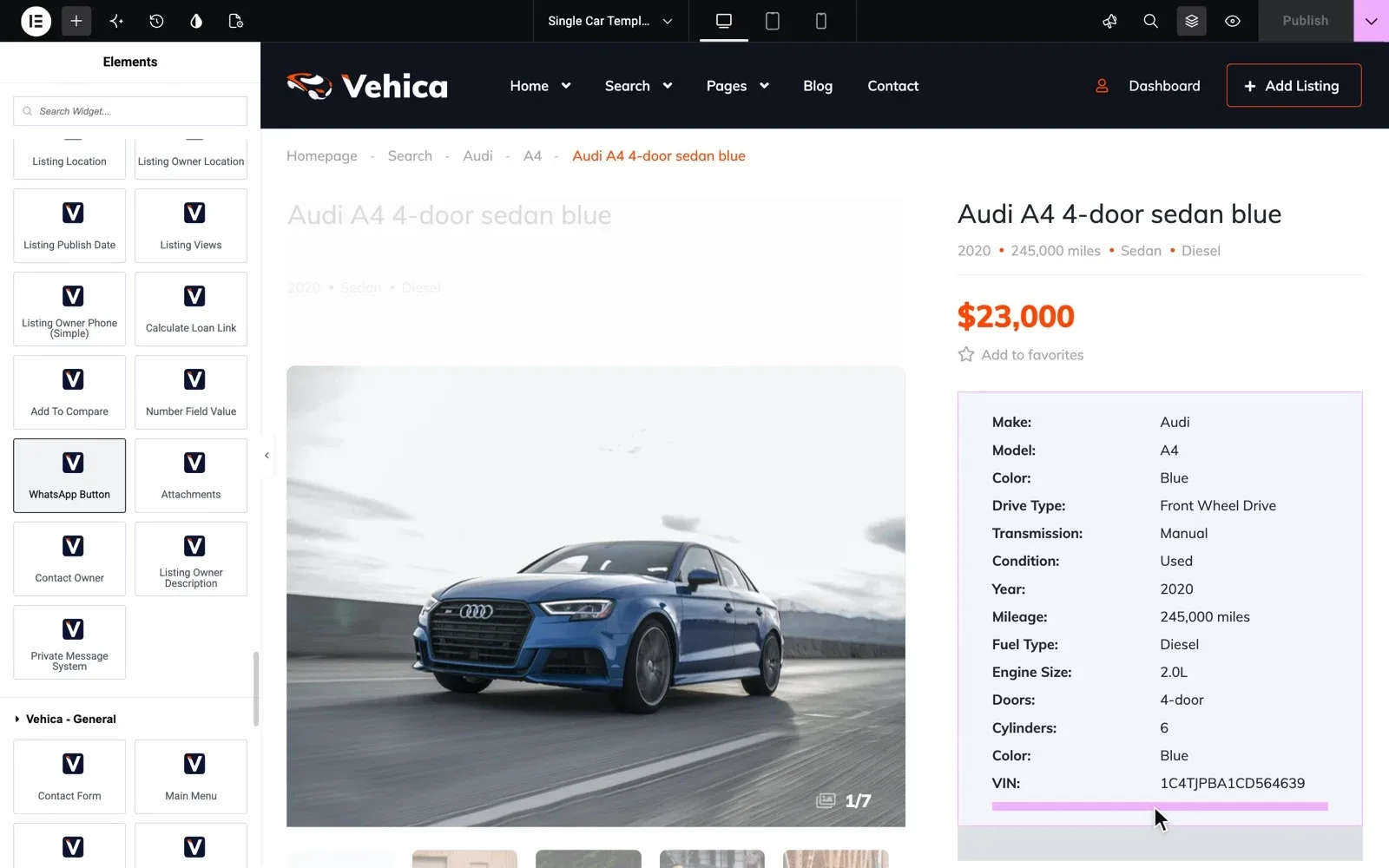
Prefer the whole calculator on the car page? Add the loan calculator block instead, and it fills in the price too. The demo car pages have neither, so add one to each car page template you use.
3. Show Calculate financing in your search results
Buyers compare several cars in the results before they open one. In Vehica, a Calculate financing link under each car's price opens the calculator with that price.
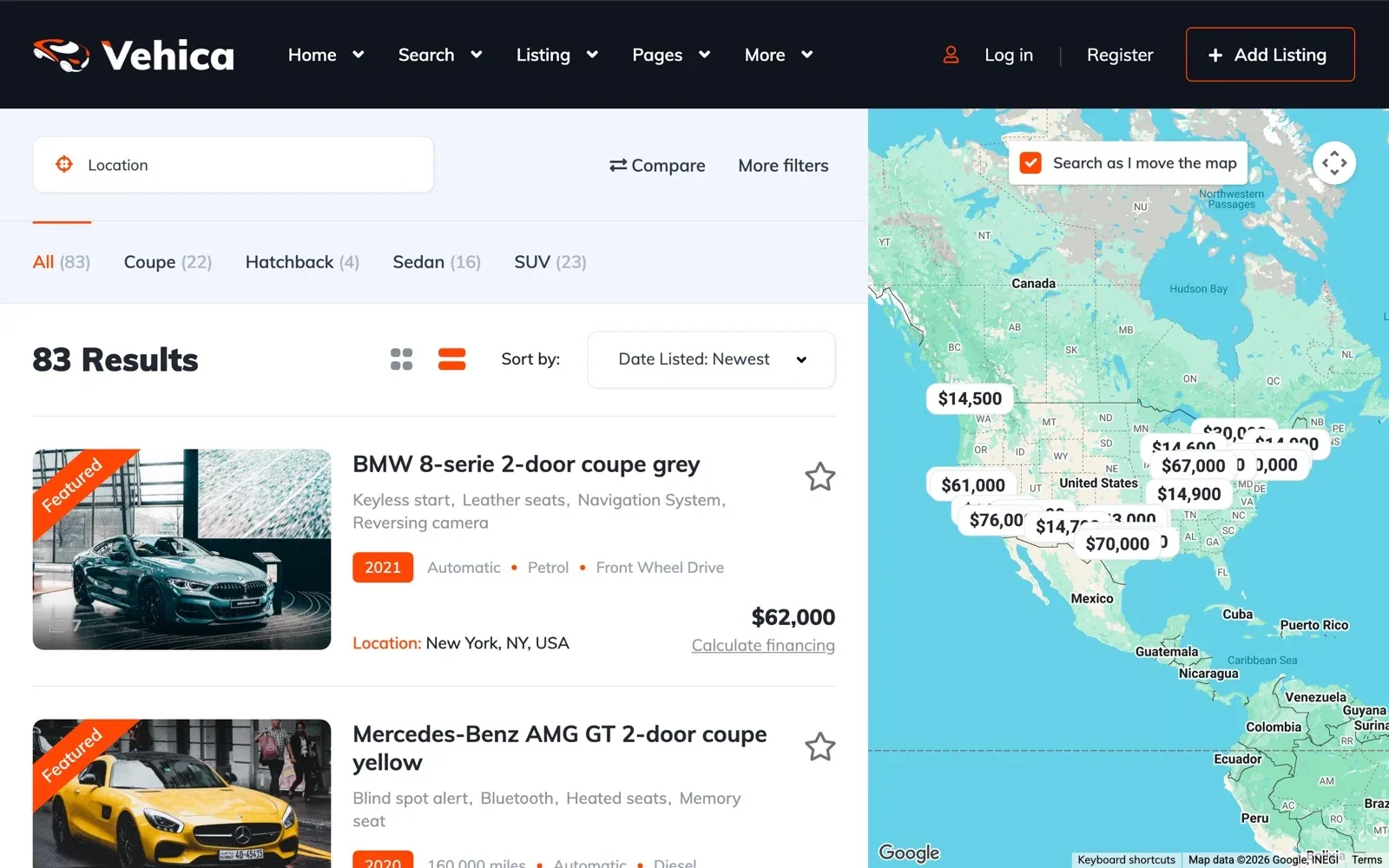
Do other dealers post cars on your site too? Calculate financing shows under every car in the results, so their cars get it as well. See how to create a website like Cars.com for the marketplace side.
Try the loan calculator on your own Vehica website
Your own Vehica website with the demo, its calculator page and the full WordPress admin, ready in a minute.
Try Vehica free Free for 7 days. No card needed.4. Use your currency and your buyers' words
The calculator uses the currency, the sign and the number format you set for the whole site. How to change currency and price format? shows where to set them.
Rename labels such as Price, Interest Rate and Monthly Payment in the Vehica Panel, under Translate & Rename. Write Deposit instead of Down Payment if your buyers say so.
5. Write the text next to the calculator
Template: the text above and below the calculator
Paste each part into the calculator's settings in Elementor.
Replace the words in brackets. Before you show a rate, ask your lender which local rules apply.
Then make the next step easy. A Vehica car page can show your phone number, a WhatsApp button and a message form.
6. Let the rate change with the number of months
Lenders often charge a higher rate for a longer loan. Vehica's calculator can do the same when the buyer changes the months. The code snippet for it is in Loan Calculator – The interest rate change when user change number of months.
The snippet goes into a child theme, so add it after you buy Vehica and run the site yourself. A child theme keeps it when Vehica updates, as how to update a WordPress theme without losing your changes explains.
The formula for a monthly car payment, with an example
Most monthly payment calculators for a car use the same formula, payment = loan × r ÷ (1 − (1 + r)^−n). The loan is the price minus the down payment, r is the yearly rate divided by 12, and n is the number of months. The payment stays the same every month, while the part that goes to interest shrinks.
Say the price is 20,000 in your currency and the buyer puts 4,000 down. That leaves a loan of 16,000, here at 6% a year.
| Months | Monthly payment | Total interest |
|---|---|---|
| 36 | 486.75 | 1,523.04 |
| 48 | 375.76 | 2,036.50 |
| 60 | 309.32 | 2,559.49 |
| 72 | 265.17 | 3,091.97 |
A longer loan lowers the monthly payment, but the buyer pays more interest. At 72 months, the interest is 3,091.97, about twice the 1,523.04 at 36 months. Show both numbers, so no buyer feels tricked later.
To check your site, type =PMT(6%/12, 48, -16000) into Excel or Google Sheets. It gives 375.76, as Vehica's calculator on the demo does with these numbers.
The car loan calculator checklist
Tick each item as you set it up. All of them work on a free trial site, except the snippet at the end.
From the calculator page to going live
12 tasks
The calculator page
-
A rate nobody can get makes buyers doubt the rest of the page.
How to customize Loan Calculator? -
For example, Deposit instead of Down Payment.
Car pages and results
The words next to it
Before you go live
-
=PMT(rate/12, months, -loan) gives the same number.
-
-
-
Only on the site you run yourself, not in the free trial.
Loan Calculator – The interest rate change when user change number of months
Running a small used car lot? Our guide to a used car dealer website covers the rest of the site, from photos to sold cars.
Vehica Theme is very easy to use and their customer service is one of the best. marketingcarle, verified Vehica customer
Rather not touch the code yourself?
Premium Support from the team that made Vehica helps you set up the calculator and the rate-by-months snippet. 12 months come with every license bought here.
Premium Support
The people who wrote your theme fix errors, plugin conflicts and slow pages on your own site, for 12 months.