Car dealer website design ideas: 7 home page layouts
Seven home page layouts for a car dealer website, each a real page you can open. See who each one suits, what it shows first, and how to make it yours.
In this guide
- Good dealer website design puts the search for a car at the top
- Vehica has 7 home page layouts in one demo, and you can open each one
- Choose a layout by your photos, your stock and where your buyers live
- One primary color in the Vehica Panel changes buttons, prices and labels everywhere
- Keep your phone number one click away, and mark sold cars with a Sold label
Good car dealer website design starts with one question. What does a buyer want to do first on your home page? Most want to find a car, so the best layouts put the search right at the top.
Most car dealer website examples online are screenshots of other dealers' sites. The seven below are live pages of one demo, so you can open each one, search and click.
Design is one part of the job. For every other step, from your stock to calls and WhatsApp, read our guide to building a car dealer website.
What good car dealer website design puts first
Buyers on a dealer's home page want three answers fast. Do you have the car they want, can they afford it, and how do they reach you?
Good design answers those questions in that order, from the top of the page down. Your story, your team and your awards come after.
- Search by make, model and price at the very top
- Real photos of your own cars, not pictures from the internet
- A short row of the cars you most want to sell
- Your phone number and WhatsApp within one click
- Your address and opening hours, easy to find
Seven home page layouts, and who each one suits
Vehica comes with one demo that holds seven home pages, each a different dealer website layout. You import the demo once, and all seven become pages on your site.
The layouts differ at the top, which is what buyers see first. Further down, six of them share the same blocks, such as featured cars and popular makes.
Car dealership website design ideas from one demo
Each card opens the layout on the live Vehica demo.
-
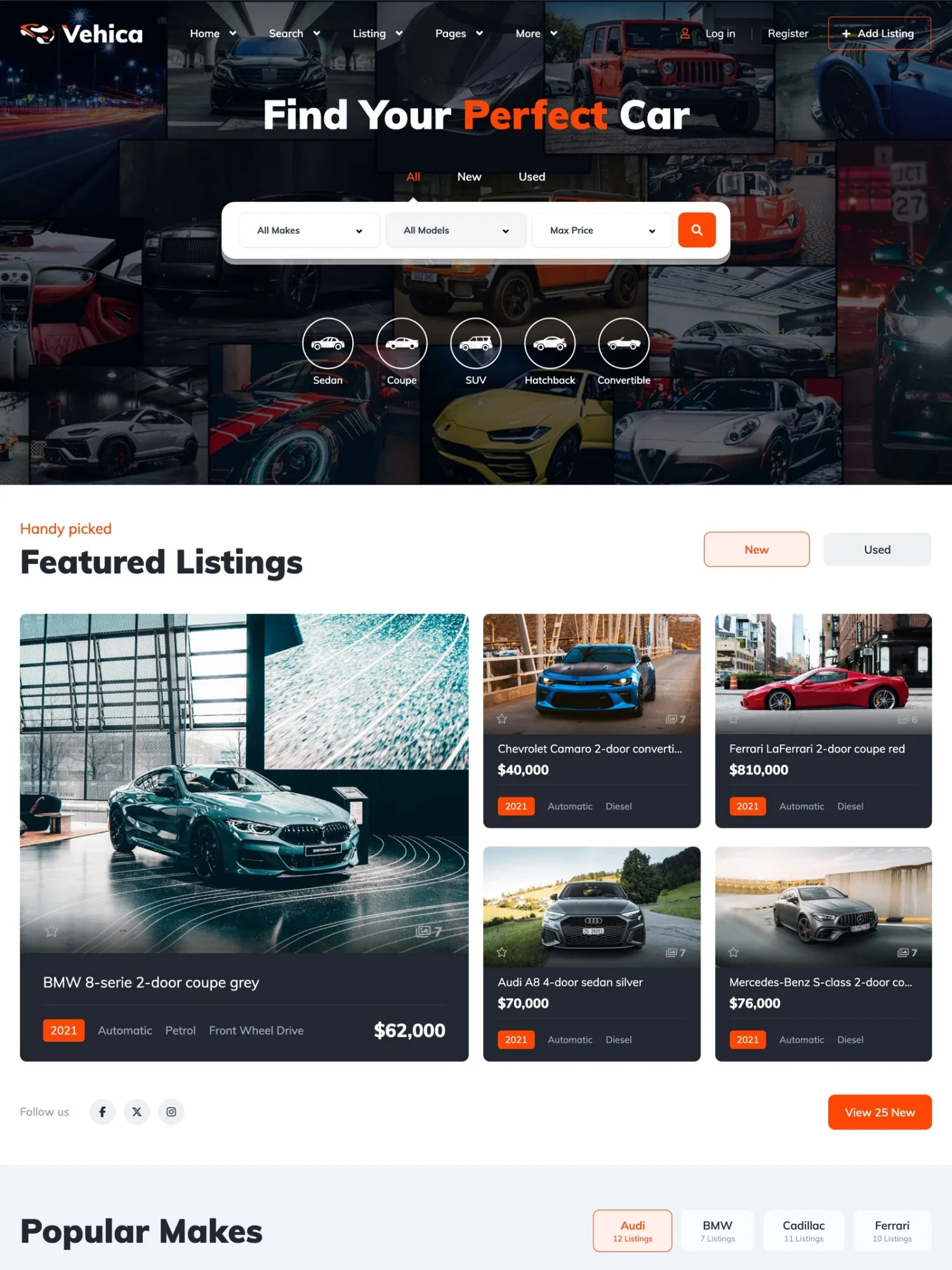
Mosaic, a wall of car photos behind the search
A grid of car photos fills the top, with search by make, model and price over it. Round body type icons, such as SUV and Coupe, sit right under the search.
View demo -
Car Dealer, a welcome slide for one showroom
A big welcome slide with a View Inventory button comes first, so buyers reach your cars in one click. Featured cars, a block for your customer reviews and your phone with opening hours follow.
View demo -
Location, search by place and distance first
Buyers type a town and pick a distance before anything else, with tabs for all, new and used cars. Search by place needs your own Google Maps key with billing.
View demo -
Modern, a drawn city skyline behind the search
A drawing of a city and a car on a blue background sits behind the headline and the search by make, model and price. Featured cars and popular makes follow right below.
View demo -
Classic, a search card that counts your cars
A short welcome text sits next to a search card with make and a price range. Under it, a line counts the cars that match, 83 on the demo.
View demo -
Video, a moving background behind the search
A short video plays behind the headline and the search, with body type icons below. Film your own showroom or lot, and keep the clip short.
View demo -
Slideshow, your best cars one after another
Large photos of cars change behind the search, one after another. Use it for the few cars you most want to sell this month.
View demo
The cars, prices and photos on the demo are samples. On your site, the same blocks show your own cars.
How to pick the right layout for your dealership
Pick the layout by your stock and your buyers, not by the one that looks best on the demo. Four questions decide it for most dealers.
- Do you have sharp photos or video of your own cars? Mosaic, Video and Slideshow need them. Without them, start from Modern, which uses a drawing instead.
- Is your lot small? Car Dealer or Classic puts your welcome first, which suits a few cars better than a big search.
- Where do your buyers live? Location fits buyers who search near home. For buyers from the whole country, pick a layout that searches by make and model.
- Will buyers open it on a phone? Many will, so open each layout on your phone before you choose.
Selling premium cars? Our guide to a luxury real estate website shows the same rules for homes, with fewer listings, big photos and one primary color.
You can change your mind later. All seven layouts stay on your site, and WordPress lets you set any page as your home page.
Open all seven layouts on your own website
Get a real Vehica website with the demo already in place and the full WordPress admin, ready in a minute.
Try Vehica free Free for 7 days. No card needed.Make any layout yours, from colors to car cards
The demo is orange, but your brand may not be. In the Vehica Panel, you pick one primary color and save, and buttons, prices and labels change on every page.
Your logo, contact details, currency and fonts sit in the same panel, with 800+ Google Fonts to choose from. The guide How to start customizing Vehica Theme? walks through the panel in order.
Keep that one color for what buyers click and compare, such as buttons and prices. One font for headings and one for text is plenty.
Change headlines and blocks in Elementor
Every page, header and footer opens in Elementor. Change a headline, drag a block to a new place and click Publish, with no code.
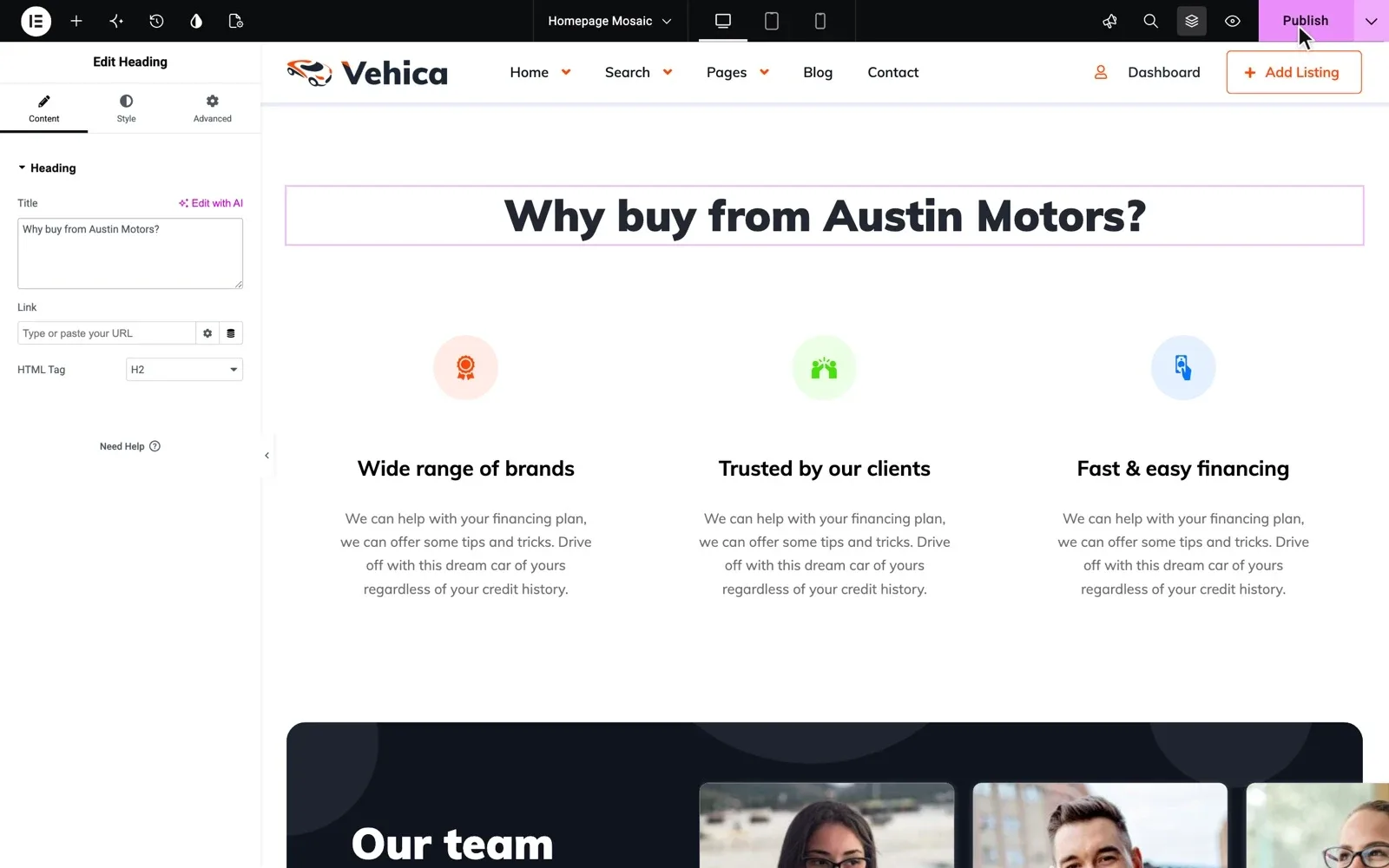
Start with the headline. Use the words a buyer would search, such as what you sell and your town. "Used family cars in Leeds" says more than "Find your perfect car".
Vehica adds its own blocks to Elementor, such as search forms, featured cars and a loan calculator. You also choose which fields the home page search shows, and in what order.
To add an icon for a type you sell, such as a pickup, follow How to add new category icon to homepage (hero section)? To show a row of only SUVs or one make, read Custom List of Vehicles.
This theme is one of the easiest themes I have ever worked with. dawnybelle, verified Vehica customer
Choose what every car card shows
Car cards fill most of a dealer home page, so they matter as much as the top. You pick the details each card shows, such as year, mileage and fuel type, and every card follows.
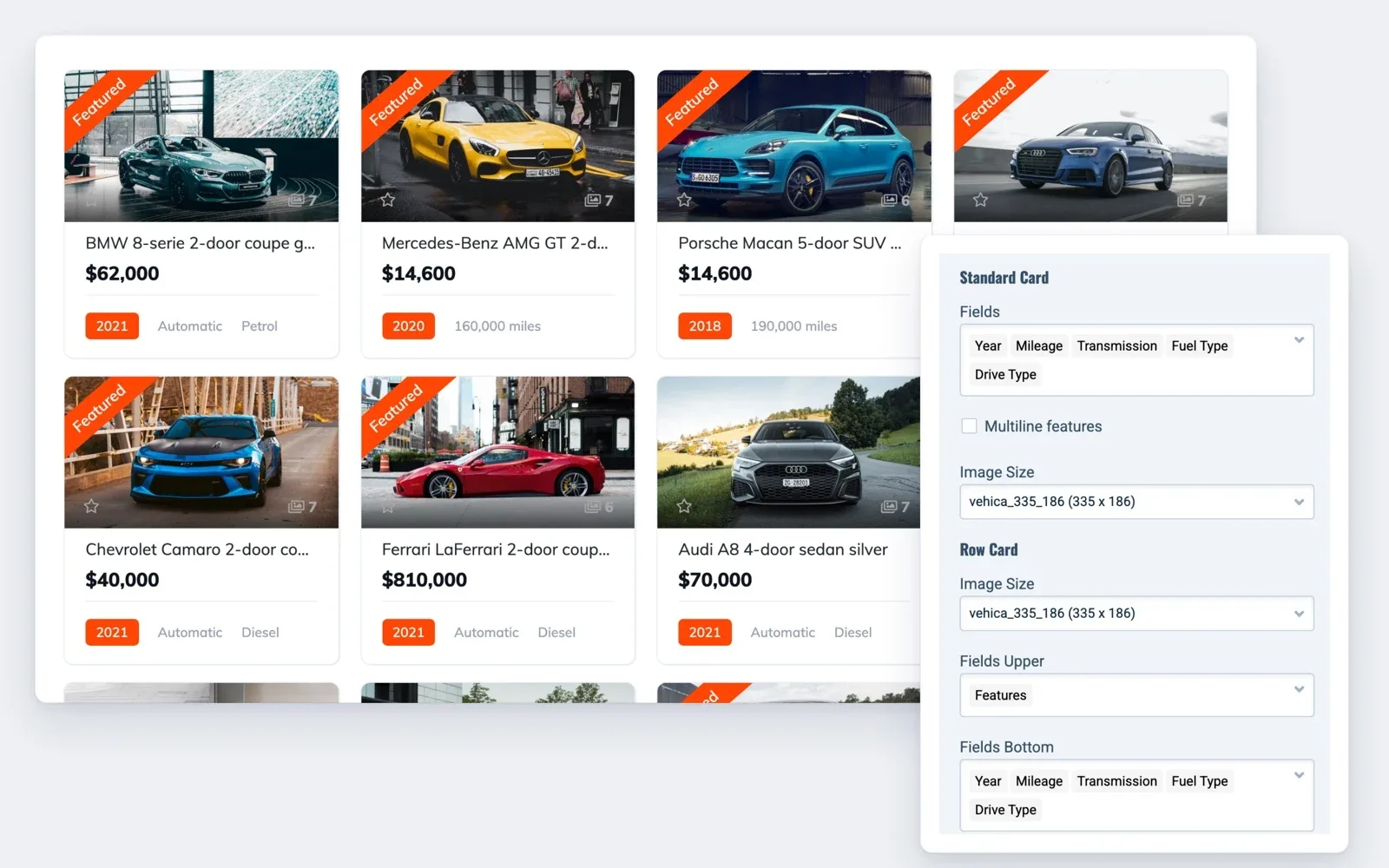
Show three or four details, the ones your buyers ask about first. A Featured label marks the cars you want to sell first.
Five design mistakes that cost dealers calls
Most of these come from copying a general business website. A car buyer wants one car, and anything between them and the search slows them down.
- A slogan or a slider with no search and no button to your cars
- Photos from the internet, or your own cars shot in different light and from odd angles
- The phone number only in the footer or on the contact page
- Several bright colors that fight with your buttons
- Sold cars that still look like they are for sale
Vehica helps with the last one. A Sold label shows as a ribbon on the car card, and sold cars can be kept out of search results.
Running a small lot? Our guide to a used car dealer website covers photos, sold cars and calls for a lot with a small team.
Rather have us design your dealer website?
No time to pick a layout, set your colors and write the headlines? We design the whole dealer website on Vehica for you.
Custom Website
Photos, your logo and a few words are enough. We design and write the whole website, and you pay only when you approve it.