How to make money with a directory website
A directory website earns when businesses pay to be found. Here are six ways to charge them, which one to start with in your niche, and a calculator for your numbers.
In this guide
- Listivo can sell monthly plans, paid listings and featured days
- Start with free basic listings, then sell featured days in busy categories
- Monthly plans for business accounts bring the steadiest income
- In a niche where one customer is worth a lot, offer plans sooner
- The calculator shows a month and a year from your own numbers
Here is how to make money with a directory website. Businesses pay you for a listing, for featured days at the top or for a monthly plan. Which one they pay for first depends on what one new customer is worth to them.
If your site is not built yet, start with our guide to the directory website. Come back here once it is live.
The directory website business model
A directory serves two groups of people. Visitors come to find a plumber, a clinic or a wedding venue, and they never pay to search. Businesses come to be found, and they pay when the directory brings them customers.
A directory also earns differently from a classifieds site. An ad sells one thing and ends, so people pay per ad. A business listing stays up for years, so the steadiest income is a monthly plan.
Six ways to monetize a directory website
Each way below is a setting you switch on in Listivo. Start with one or two, then add more as your directory grows.
Who pays for what
Each card links to the help guide for that setting.
-
A monthly plan for each business
A business picks a plan with a set number of listings, featured days and bumps. Stripe renews it every month, and the business can switch plans in its Settings.
Subscriptions (Membership) - how to configure -
Paid listings for a set number of days
A business buys a package before its listing goes live. The package sets how many listings it holds, how many days they stay live and how many days they are featured.
Monetization system -
Featured listings at the top
A featured listing shows first under Most Relevant, with a Featured label and its own card colors. A business can add featured days to a live listing, and its end date stays the same.
Featured Packages -
A move back to the top
A bump moves a live listing back to the top of its group in the results. Businesses buy one bump or a pack, and a package can bump a listing on a schedule.
Monetization - Bump Up (Manual and Automatic) -
Offers made for business accounts
People sign up with a private or a business account. A plan or a package can be offered to one account type only, so companies get an offer made for them.
Type of user accounts - private or business -
A free basic listing with paid extras
An always-free package or a free monthly plan lets every business join, and the free monthly plan needs Stripe. Businesses then pay only for featured days, bumps or a bigger plan.
Free Package, Free Registration, Free Subscription and WooCommerce Coupons
You can run several of them on one site and change them later. Which one comes first depends on your niche.
Which way to start with in your niche
One wedding pays a venue well, and one coffee pays a cafe little. So a venue will pay for a monthly plan sooner than a cafe.
Not sure about your niche yet? Our list of niche directory website ideas shows who pays in each one. If private users will post ads on your site too, read how to make money with a classified ads website.
| Your directory | First paid offer | Add later |
|---|---|---|
| Wedding venues, lawyers or builders | Monthly plans with featured days | Bumps on a schedule |
| Cafes, salons and shops in one town | Featured days, with listings kept free | A monthly plan for the busiest ones |
| Seasonal businesses, such as ski schools | Packages with a set number of days | Featured days in the busy season |
| Private tutors next to tutoring schools | Plans for business accounts only | Featured days for everyone |
How to make money with a directory website, step by step
Take these steps one at a time, and move on only when the one before it works. In a niche where one customer is worth a lot, such as wedding venues, you can go from step 1 straight to step 3.
1. List the first businesses for free
An empty directory earns nothing, so add the first businesses yourself and keep a basic listing free. Without paid packages, a listing can stay live with no end date.
Then invite each business to sign up and post its own listing, and delete the basic one you added once it does. Each business runs its listings from its own panel and gets a public page that shows all of them. Our guide on how to get businesses to list on your directory shows what to send them.
2. Sell featured days in your busiest categories
Featured days are an extra, and a business that skips them keeps its free listing. A business opens My Ads, clicks Promote next to a listing and pays at checkout. You can rename the word "ads" to "listings" across the site, as How to Translate or Rename All Texts shows.
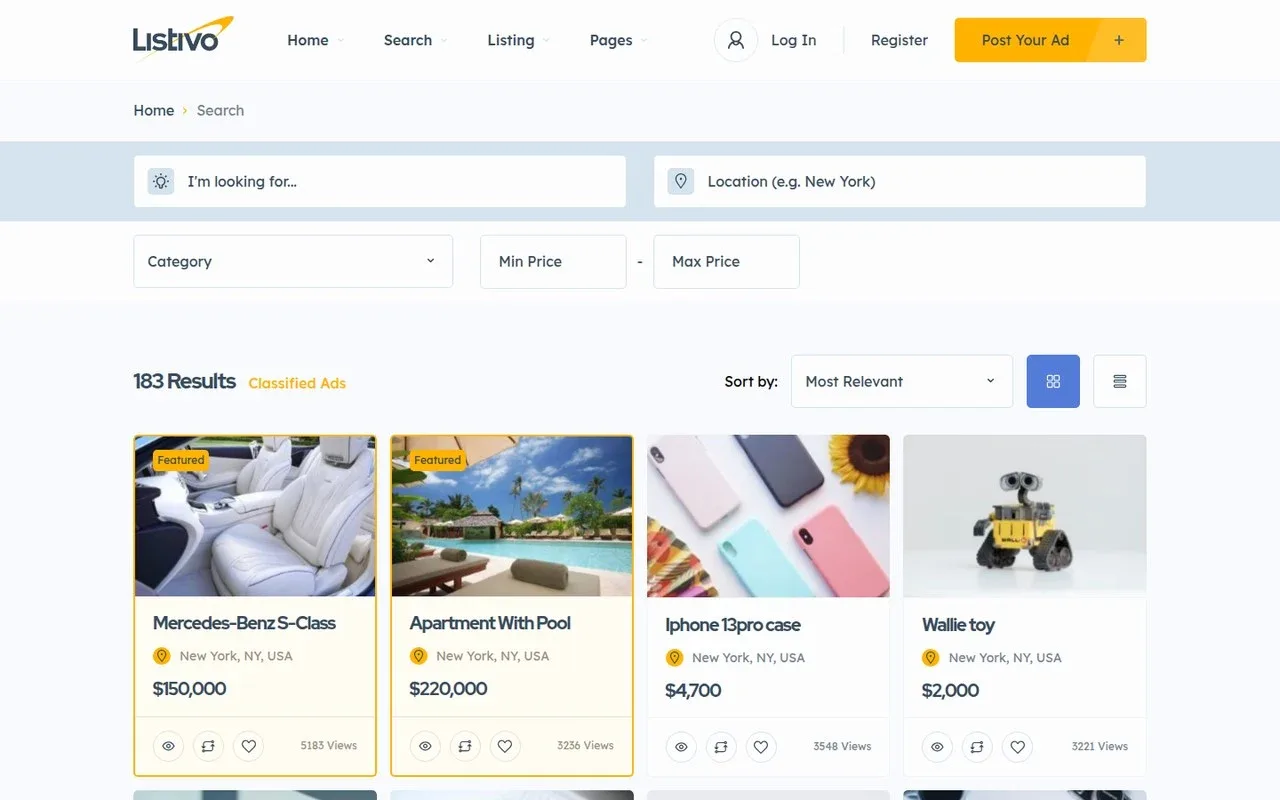
Start where businesses compete hardest for customers. A package can be limited to some categories, so featured days are sold only where they pay off. Bumps help a listing that has slipped down, and our guide to featured ads vs bump up compares the two.
3. Offer monthly plans to business accounts
Once businesses get calls and messages through your site, offer them a monthly plan. Put more featured days and bumps in each bigger plan, so the step up is easy to see.
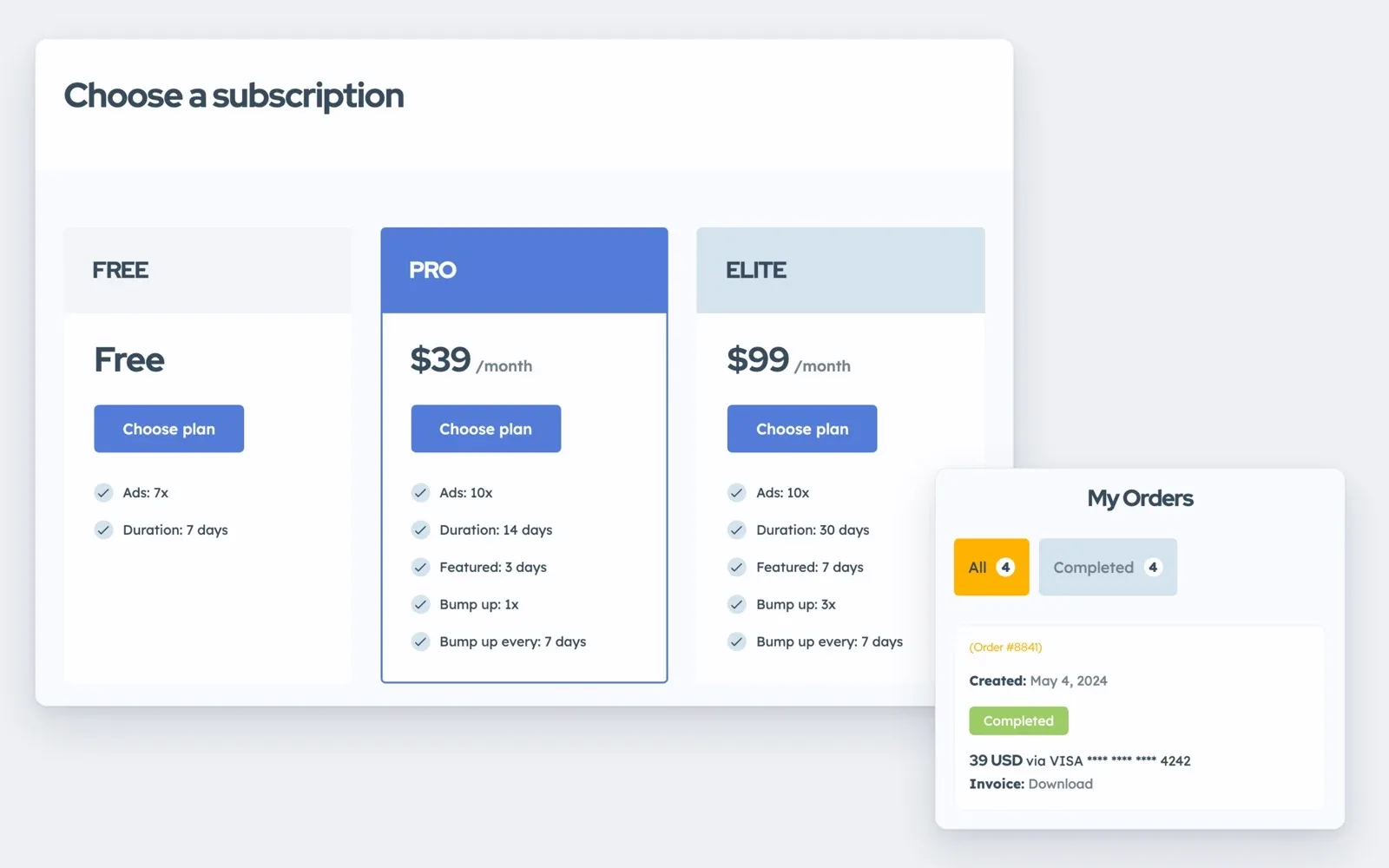
If private people can post too, limit the plans to business accounts, so the offer speaks to companies. Business sign-up can ask for a contact person and company details.
Are directory websites profitable?
Yes, when the directory sends real customers to businesses in one niche or one town. The first months bring little money, while you fill the directory and bring in visitors. After that, your income comes down to a few numbers.
The calculator counts packages and upgrades, and a monthly plan works like a package bought again every month. So for plans, type all the businesses listed in the first box, the share on a paid plan and the average plan price. With 300 businesses listed and 20% on a plan, 60 businesses pay you every month.
Work out what your directory could earn
Start low, because most businesses on a new directory pay nothing at first.
A month
800
A year
9,600
In your own currency. Packages bought plus upgrades sold, before payment fees and taxes.
Type the featured packages and bumps sold a month in the upgrade box, and their average price in the last box. The result grows with the number of businesses as much as with the price, so test one change at a time.
The result is income, not profit. Take off payment fees, the cost of running the site and your own time. Google Maps also needs a key with billing, though a free monthly credit covers most sites.
Test your directory idea on a real Listivo website
Get your own Listivo website with the demo you pick and the full WordPress admin, ready in a minute.
Try Listivo free Free for 7 days. No card needed.Five mistakes that cost a new directory money
- Charging businesses before your directory sends them any customers
- Starting with a whole country instead of one town or one niche
- Selling the same plan to a cafe and a wedding venue
- Letting listings go out of date, so visitors stop trusting them
- Living on banners alone, which pay little while traffic is small
Banners can still add money once traffic is steady. A local supplier may pay for one on your home page, and you add it in Elementor like any other block.
Rather have us build your directory?
We can build your whole Listivo directory, with its categories, monthly plans and featured days set up for you.
Custom Website
Photos, your logo and a few words are enough. We design and write the whole website, and you pay only when you approve it.