How to get businesses to list on your directory
A new directory has to make the first move. List local businesses for free, tell them, then give them a reason to run their own listing.
In this guide
- List the first businesses yourself, with facts they publish
- Email each business, then call the ones who do not reply
- Offer founding businesses free featured days
- Follow up once, with how many times the listing was viewed
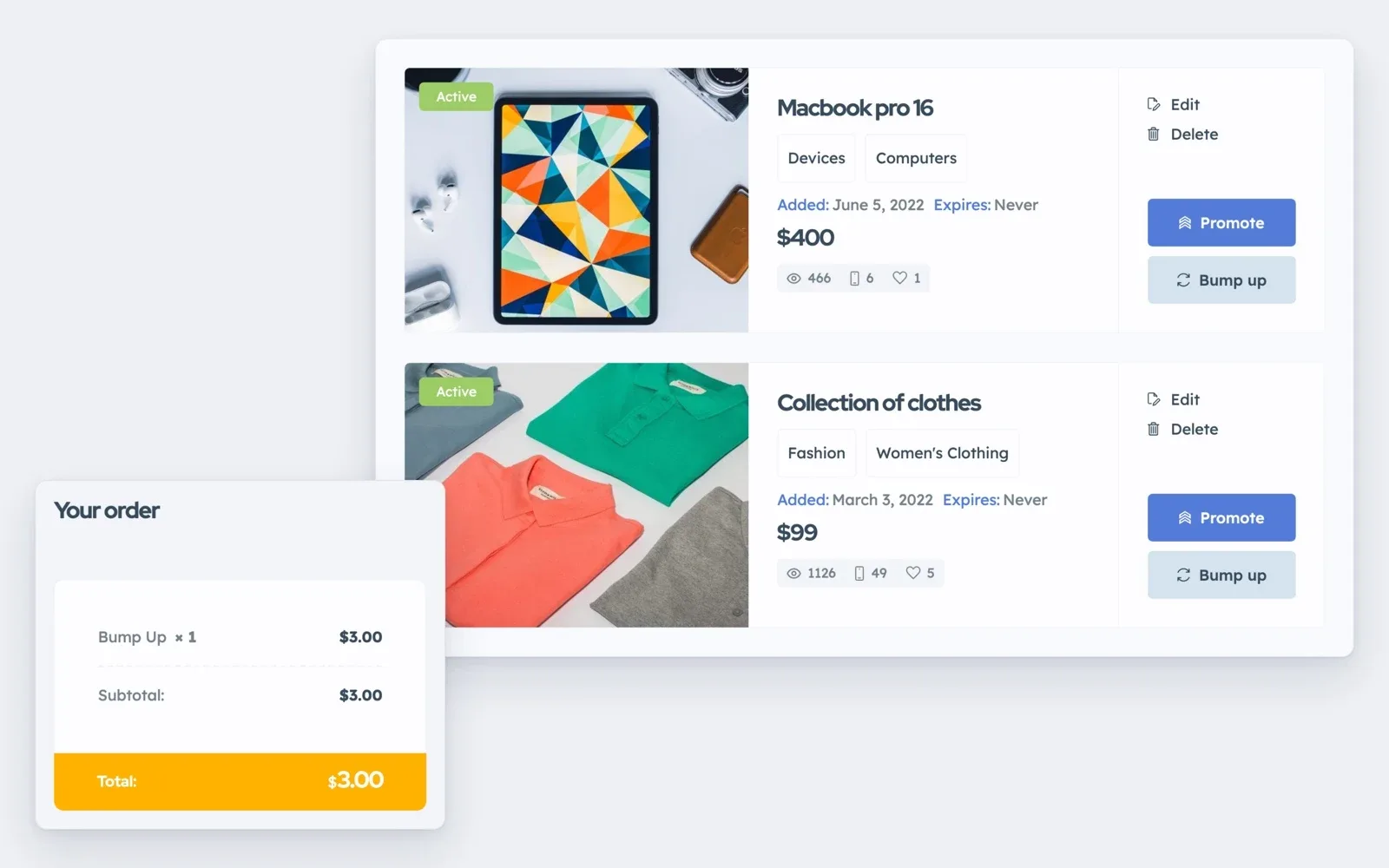
- In Listivo, each business runs its listing from its own panel
Here is how to get businesses to list on your directory when nobody knows it yet. Add them yourself first, then email, call and follow up once, with an offer for the first businesses in each category.
Below is the whole plan as a checklist, with three messages to copy. If your site is not built yet, start with our guide to the directory website.
Why businesses do not come to a new directory
A business lists where its customers already look. A new directory has no visitors yet, so a busy owner has no reason to fill in your form. This is the directory cold start.
To get listings for a new directory, you make the first move. A listing that already exists is easier to say yes to than an empty form. Classifieds sites know this problem from getting the first ads on a new classifieds website.
How to get businesses to list on your directory, step by step
The outreach checklist
13 tasks
Before you write
List them first
-
-
Contact buttons reach the account that posted the listing, which is you.
Types of custom fields -
Tell them
-
-
Send the link while you are still talking.
-
A coupon code can make a Featured package free.
Featured Packages
Hand over and keep them
1. List the first businesses yourself, the fair way
Start with one town or one niche, so the directory looks full from day one. Our guide to the local business directory helps you choose.
Use only facts a business publishes itself, and never copy photos or reviews from other websites. A basic listing needs only four details.
- The business name and its category
- The town or the address
- The phone number and the website
- One line about what the business does
In Listivo, a listing you post comes from your own account, so messages sent through the site reach you. Pass each one on the same day. Show the business's own phone and website in fields of their own, so customers can also call it directly.
Add your first businesses to a real Listivo website
Get your own Listivo website with the demo you pick and the full WordPress admin, ready in a minute.
Try Listivo free Free for 7 days. No card needed.2. Tell them by email, then by phone
Directory listing outreach works best in two rounds, an email first and a call a week later. Write while the listing is still news.
The first email to a business
The first line is the subject.
Replace the words in brackets, and keep the removal line.
Many owners never open email from a stranger. After a week, call the ones who did not reply, or visit at a quiet hour.
The phone script
Read it out loud once before your first call.
Replace the words in square brackets. Lines in round brackets are for you, not for the call.
3. Give founding businesses a reason to say yes
A free listing is good, but a reason to act this week is better. Give the first businesses in each category something later ones will not get.
- Free featured days, so their listing shows first in the results
- A basic listing that stays free, even after you start charging others
- Your help to set up the listing, on the phone or in person
In Listivo, a Featured package adds featured days to a live listing, which then shows first under Most Relevant. A WooCommerce coupon with a 100% discount makes it free for anyone with the code.
When the free days end, a business that got customers from your site can buy more. Read how to make money with a directory website for what else to sell.
4. Follow up once, with a number
Two weeks after the first email, write once more, with proof that your directory brings them visitors. Listivo can show how many times each listing was viewed, right on its card. Add the messages you passed on.
The follow-up email
Use real numbers only. If they are still small, lead with the offer.
If there is still no reply, stop writing. Keep the free listing up, unless the owner asks you to remove it.
5. Let each business run its own listing
In Listivo, the simple handover is a new listing. The business posts its own listing from a business account, and you delete your basic one.
Offer to stay on the phone while the owner signs up as a business and posts the listing.
From then on, the business edits photos and details, answers messages and promotes the listing from its own panel. Turn on reviews too, so customers can rate it.
Rather call businesses than run a website?
We keep your Listivo website running while you sign up businesses, so your time goes to them, not to the site.
Site Care
The team that made your MyHome, Listivo or Vehica site keeps it backed up, updated and fast, with Premium Support included.