How to turn off Menu “Dashboard” / “Log in/Register”
Hide the user area in the Vehica header — the Dashboard link that signed-in visitors see, and the Log in / Register links shown to everyone else — using a single option in the Vehica Panel.
1 minute read
This article shows how to turn off the “Dashboard” link and the “Log in / Register” links in the header.


You can turn it on and off via Vehica Panel > Basic Setup > Header, with the option Display User Menu for logged in users and “Login / Register” links for not logged in.
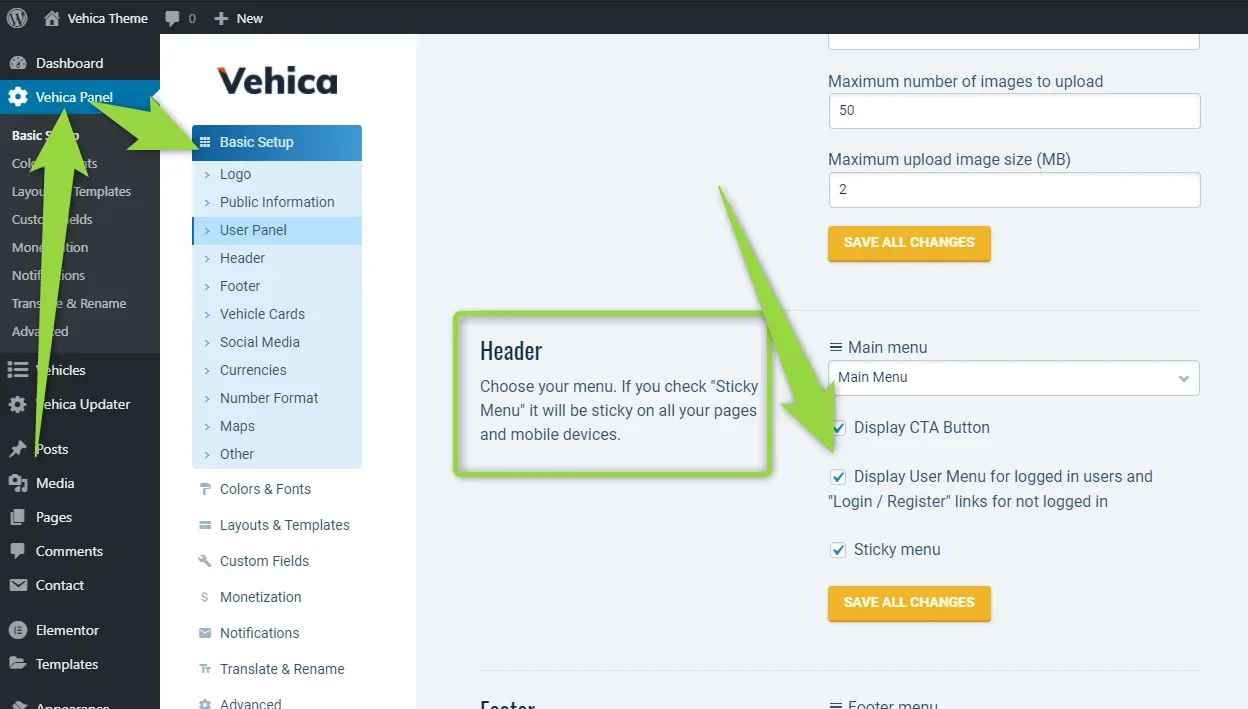
One option covers both
The same checkbox controls the user menu for logged-in visitors and the “Login / Register” links for everyone else — you cannot hide only one of them here.
Ask the people who build Vehica
We answer by email from support@tangiblewp.com. With Premium Support, we also fix your site when something breaks.
We can also run your site for you, or build a new one.
Was this guide helpful?