Sticky Menu Setup: Keeping Your Menu Visible as Users Scroll
Keep the Listivo menu pinned to the top of the screen while visitors scroll, on both desktop and mobile, using one option in the Listivo Panel.
1 minute read
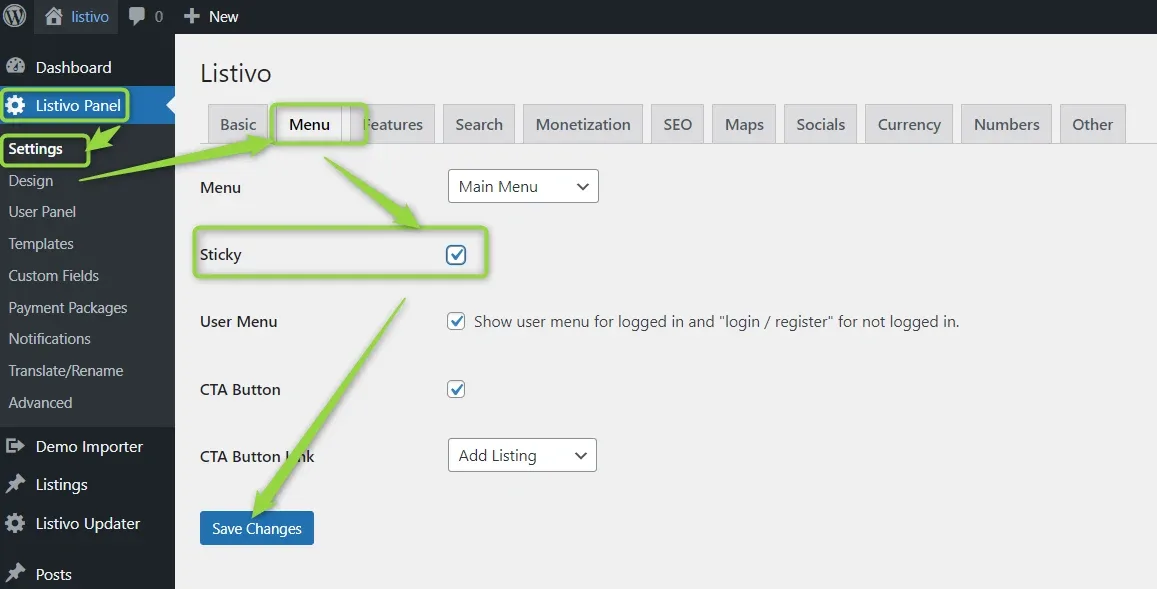
The Listivo menu includes a built-in Sticky option. This feature keeps your menu fixed at the top of the screen as users scroll down. It works automatically on both desktop and mobile devices. You can enable it via the Listivo Panel under the Menu section.
Keep reading
Ask the people who build Listivo
We answer by email from support@tangiblewp.com. With Premium Support, we also fix your site when something breaks.
We can also run your site for you, or build a new one.
Was this guide helpful?