Contact form - editing fields
Find the theme's contact forms in Contact Form 7 and edit their fields, using form-tags in the form template and mail-tags in the email template.
1 minute read
This article will walk you through the steps of editing fields on the Contact Form.
-
1
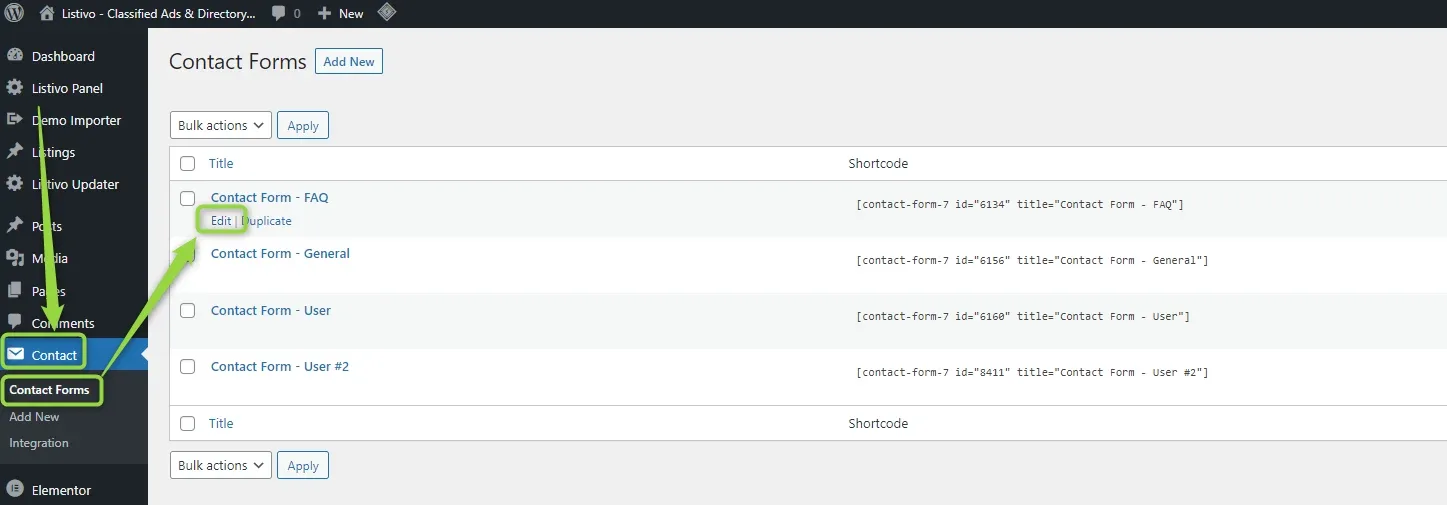
Open the form you want to edit
Go to wp-admin -> Contact -> Contact Forms and click “edit”.
-
2
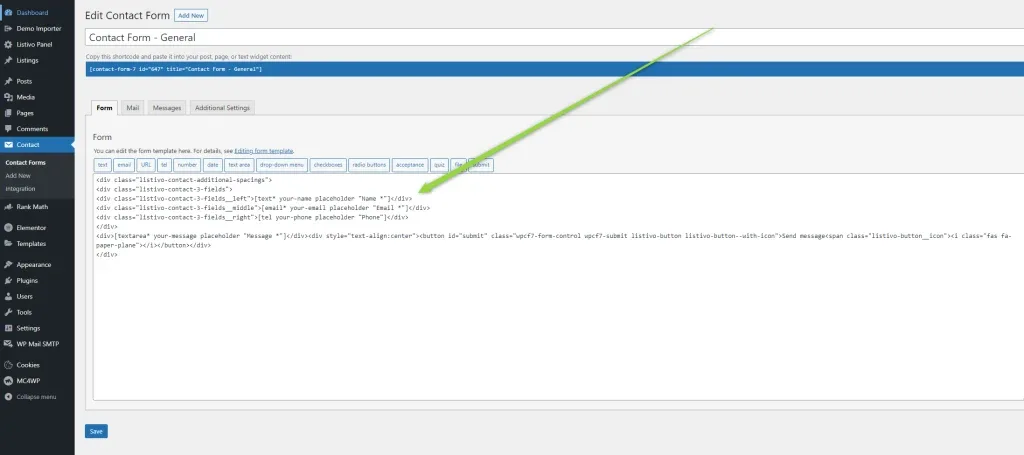
Look at the form markup
You will see the contact form fields and their HTML structure.
-
3
Edit the form and email templates with tags
You can edit the templates of your form and email using various types of tags (a string enclosed in square brackets). Contact Form 7 provides two types of tags for the form and email templates: form-tags and mail-tags. The syntax of the two types is entirely different — for example, you use
[text* your-name]in your form template and[your-name]in your email template. -
4
Check the Contact Form 7 tag reference
Please check this article on how to customize it, add new fields, etc: https://contactform7.com/tag-syntax/
Ask the people who build Listivo
We answer by email from support@tangiblewp.com. With Premium Support, we also fix your site when something breaks.
We can also run your site for you, or build a new one.
Was this guide helpful?