Automatically Ask for the Current User Location
Have MyHome ask visitors to share their location and fill the Location field for them, so a search starts from where they are — and know what to tell someone whose browser blocked the prompt.
1 minute read
You can enable a feature that asks visitors for their location. If they consent, their address is filled into the Location field automatically, so they can search for ads within a set radius — 30 miles, for example, which they can then adjust themselves.
Turn on the location prompt
To set this up, edit any page that includes the location field with Elementor — this could be your homepage or the search results template.
-
1
Open the page in Elementor
Edit the page where the Location field is present.
-
2
Switch the option on
In the Location widget, set Automatically ask for current user location to Yes.
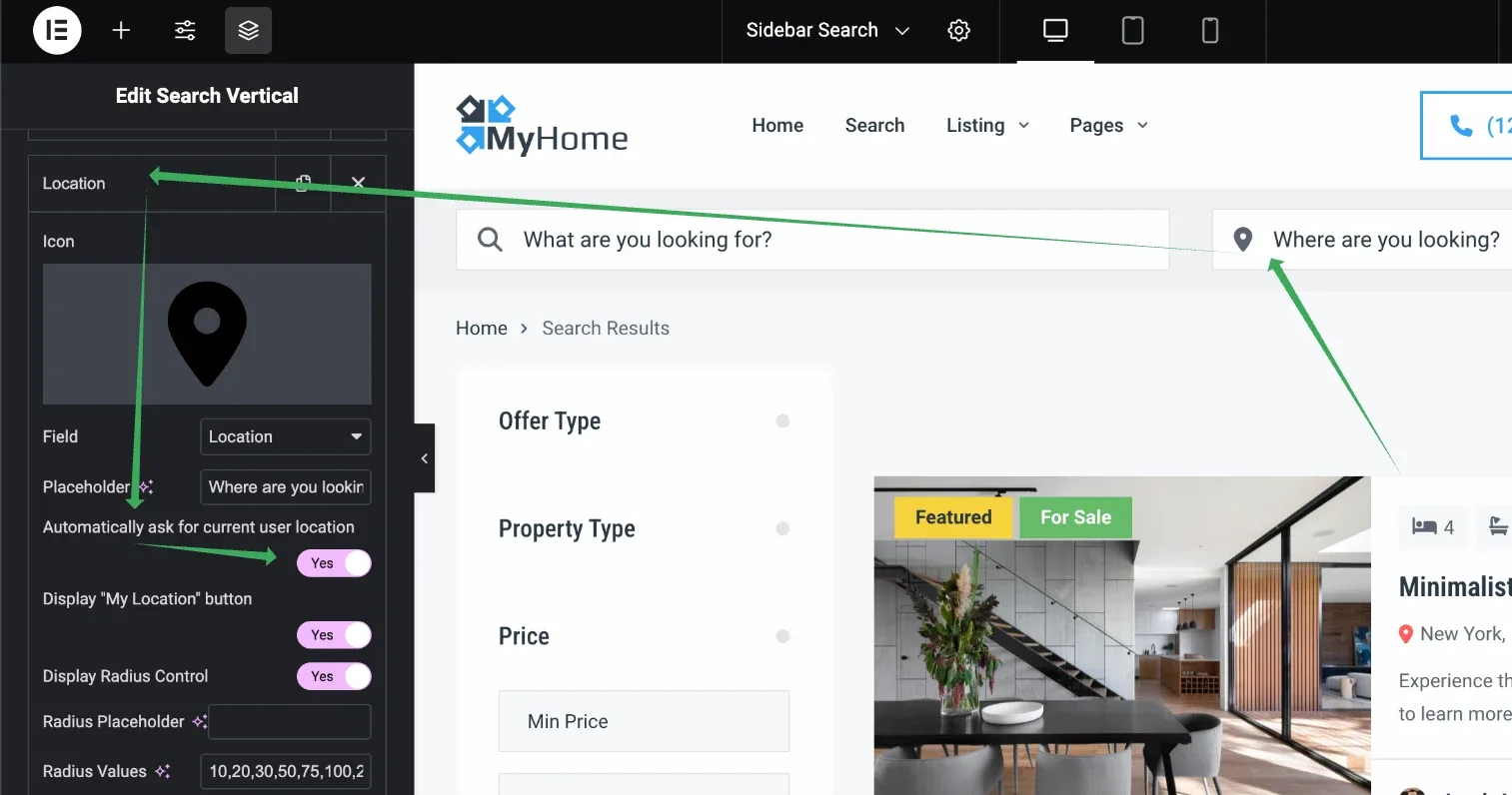
From then on, when a new visitor opens the page, their browser prompts them to share their location.

If the visitor agrees to share their location, the field is populated with their address as estimated by Google Maps.
If the visitor blocks the request

Ask the people who build MyHome
We answer by email from support@tangiblewp.com. With Premium Support, we also fix your site when something breaks.
We can also run your site for you, or build a new one.
Was this guide helpful?