Add phone number on listing card (PHP + CSS customization)
Put the seller's phone number straight onto the listing card by adding a short PHP snippet to a child-theme copy of listing_card.php — either as a plain number or as a click-to-reveal button.
1 minute read

Pick the snippet you need
There are two options.
a) For a normal phone number
<?php
$lstUser = $lstCurrentListing->getUser();
if ($lstUser && $lstUser->hasPhone()) :
?>
<a style="position:relative; display:block; z-index:10; margin-top:10px;" href="tel:<?php echo esc_attr($lstUser->getPhoneUrl()); ?>">
<?php echo esc_html($lstUser->getPhone()); ?>
</a>
<?php
endif;
?>
b) For a reveal phone number
<?php
$lstUser = $lstCurrentListing->getUser();
if ($lstUser && $lstUser->hasPhone()) :
?>
<lst-phone
:user-id="<?php echo esc_attr($lstUser->getId()); ?>"
request-url="<?php echo esc_url(admin_url('admin-post.php?action=listivo/phone')); ?>"
phone-nonce="<?php echo esc_attr(wp_create_nonce('phone_' . $lstUser->getId())) ?>"
:model-id="<?php echo esc_attr($lstCurrentListing->getId()); ?>"
>
<div slot-scope="props">
<button
v-if="!props.phone"
@click.prevent="props.onShow"
class="listivo-phone-hidden"
style="position:relative; z-index:10; margin-top:10px;"
>
<svg xmlns="http://www.w3.org/2000/svg" width="22" height="35" viewBox="0 0 22 35">
<g>
<g>
<path fill="#0b4355"
d="M18.972-.002c.397 0 .782.081 1.157.24.374.16.694.376.958.65.265.273.485.605.661.991.176.388.242.786.199 1.197l.066 28.849a5.54 5.54 0 0 1-.265 1.196 2.31 2.31 0 0 1-.66.992 4.256 4.256 0 0 1-.96.65c-.33.159-.738.238-1.222.238H3.107c-.485 0-.892-.08-1.223-.239a4.23 4.23 0 0 1-.958-.65 2.298 2.298 0 0 1-.661-.99A5.466 5.466 0 0 1 0 31.924l.066-28.85c-.044-.41.022-.808.199-1.196.175-.386.396-.718.66-.991.265-.274.584-.49.96-.65.373-.159.76-.24 1.156-.24zM3.041 2.05a1.23 1.23 0 0 0-.397.068.535.535 0 0 0-.297.24 3.035 3.035 0 0 1-.231.341.386.386 0 0 0-.066.377l-.067 3.076H20.03l-.066-3.076a.39.39 0 0 0-.066-.377 2.904 2.904 0 0 1-.232-.342.534.534 0 0 0-.297-.24 1.231 1.231 0 0 0-.397-.067zM20.03 8.203H1.983l.067 16.475h17.914zM18.906 32.95c.22 0 .374-.023.463-.068.088-.046.187-.125.297-.239a1.05 1.05 0 0 0 .232-.342c.043-.113.087-.24.132-.376l-.066-5.127H2.05l-.067 5.127c.044.137.088.263.133.376.043.114.12.228.23.342.11.114.21.193.298.24.088.044.242.067.463.067zm-6.875-3.076a3.074 3.074 0 0 0-.099.376.534.534 0 0 1-.198.307c-.11.093-.221.171-.33.24a.81.81 0 0 1-.43.102.974.974 0 0 1-.364-.102.784.784 0 0 1-.33-.24 3.489 3.489 0 0 1-.199-.307.444.444 0 0 1-.033-.376.533.533 0 0 1 .033-.41c.066-.137.132-.25.198-.342.067-.09.176-.159.33-.205.155-.045.276-.068.365-.068.175 0 .319.023.43.068.109.046.22.114.33.205.11.092.175.205.198.342.022.137.055.273.1.41z"/>
</g>
</g>
</svg>

<span class="listivo-phone-hidden__placeholder"><?php echo esc_html($lstUser->getPhonePlaceholder()); ?></span>
<span class="listivo-phone-hidden__reveal"><span>(</span><span><?php echo esc_html(lst_string('reveal')); ?></span><span>)</span></span>
</button>

<template>
<a
v-if="props.phone"
:href="'tel:' + props.phone.url"
class="listivo-phone-hidden listivo-phone-hidden--clicked"
style="position:relative; z-index:10; margin-top:10px;"
>
<svg xmlns="http://www.w3.org/2000/svg" width="22" height="35" viewBox="0 0 22 35">
<g>
<g>
<path fill="#0b4355"
d="M18.972-.002c.397 0 .782.081 1.157.24.374.16.694.376.958.65.265.273.485.605.661.991.176.388.242.786.199 1.197l.066 28.849a5.54 5.54 0 0 1-.265 1.196 2.31 2.31 0 0 1-.66.992 4.256 4.256 0 0 1-.96.65c-.33.159-.738.238-1.222.238H3.107c-.485 0-.892-.08-1.223-.239a4.23 4.23 0 0 1-.958-.65 2.298 2.298 0 0 1-.661-.99A5.466 5.466 0 0 1 0 31.924l.066-28.85c-.044-.41.022-.808.199-1.196.175-.386.396-.718.66-.991.265-.274.584-.49.96-.65.373-.159.76-.24 1.156-.24zM3.041 2.05a1.23 1.23 0 0 0-.397.068.535.535 0 0 0-.297.24 3.035 3.035 0 0 1-.231.341.386.386 0 0 0-.066.377l-.067 3.076H20.03l-.066-3.076a.39.39 0 0 0-.066-.377 2.904 2.904 0 0 1-.232-.342.534.534 0 0 0-.297-.24 1.231 1.231 0 0 0-.397-.067zM20.03 8.203H1.983l.067 16.475h17.914zM18.906 32.95c.22 0 .374-.023.463-.068.088-.046.187-.125.297-.239a1.05 1.05 0 0 0 .232-.342c.043-.113.087-.24.132-.376l-.066-5.127H2.05l-.067 5.127c.044.137.088.263.133.376.043.114.12.228.23.342.11.114.21.193.298.24.088.044.242.067.463.067zm-6.875-3.076a3.074 3.074 0 0 0-.099.376.534.534 0 0 1-.198.307c-.11.093-.221.171-.33.24a.81.81 0 0 1-.43.102.974.974 0 0 1-.364-.102.784.784 0 0 1-.33-.24 3.489 3.489 0 0 1-.199-.307.444.444 0 0 1-.033-.376.533.533 0 0 1 .033-.41c.066-.137.132-.25.198-.342.067-.09.176-.159.33-.205.155-.045.276-.068.365-.068.175 0 .319.023.43.068.109.046.22.114.33.205.11.092.175.205.198.342.022.137.055.273.1.41z"/>
</g>
</g>
</svg>

<span class="listivo-phone-hidden__number">{{ props.phone.label }}</span>
</a>
</template>
</div>
</lst-phone>
<?php
endif;
?>
Add the snippet to the listing card
-
1
Copy listing_card.php into your child theme
Copy
listing_card.phpfrom the main Listivo folder, then recreate the same folder path inside the child theme. For this file the path iswp-content/themes/listivo/templates/partials. -
2
Find the price element
Open the file in a code editor (we use VS Code) and look for the line with the
listivo-listing-card__priceelement.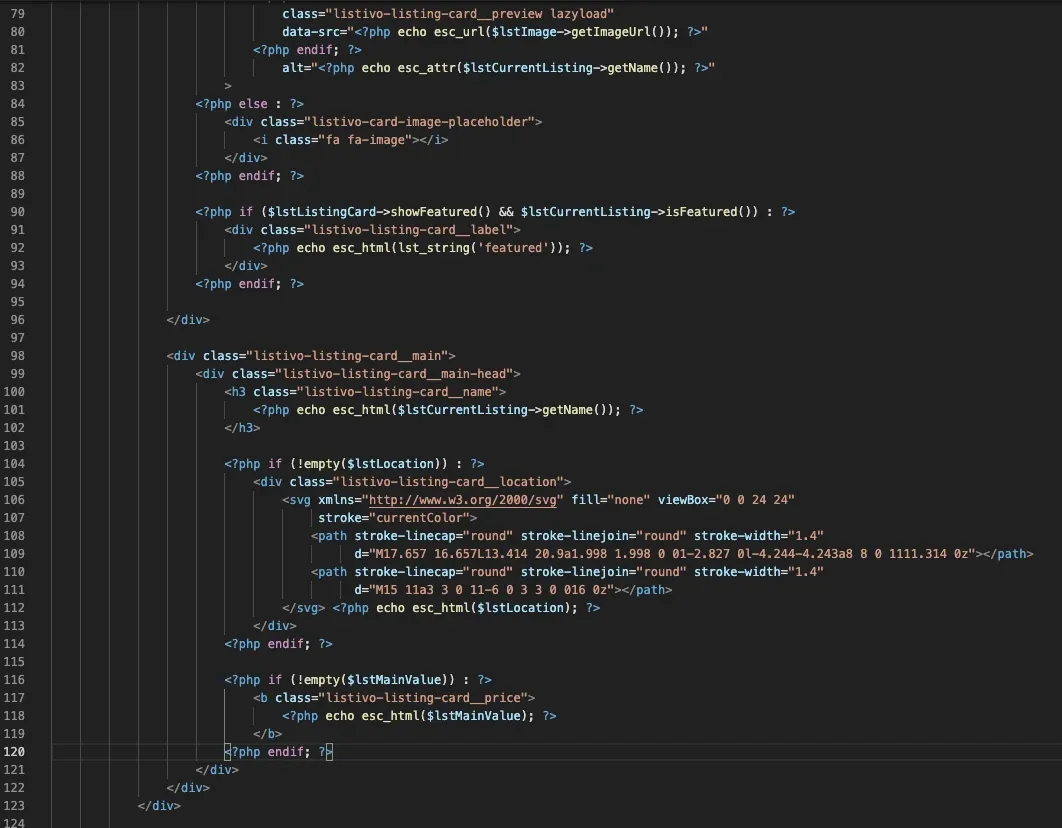
-
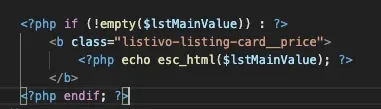
3
Paste your code after it
Put your custom PHP directly after that block. This example uses the snippet for a normal phone number.
-
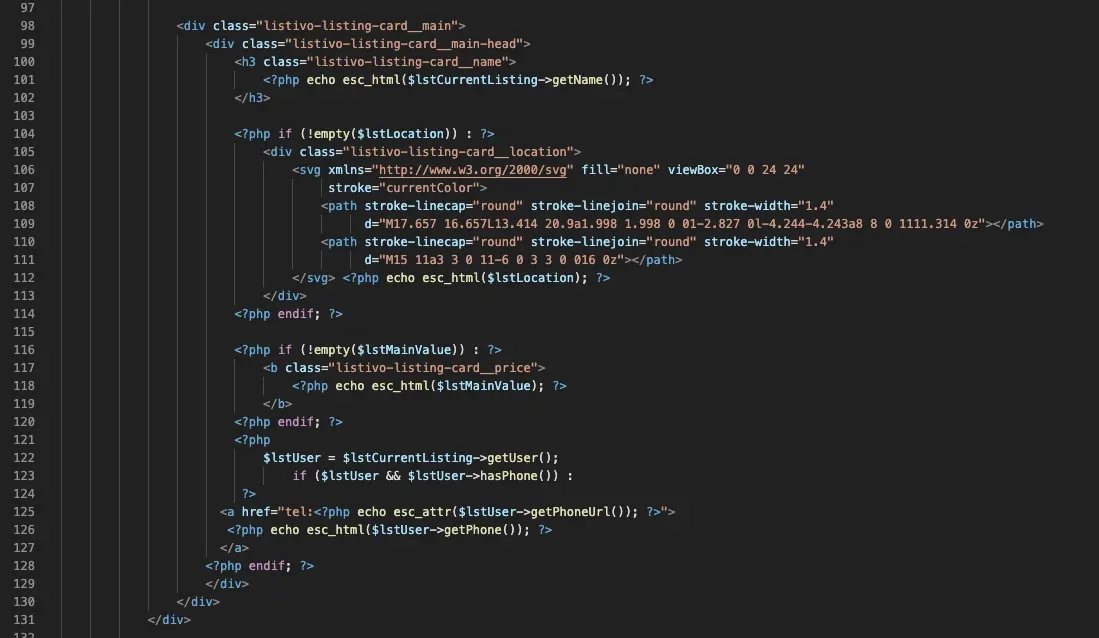
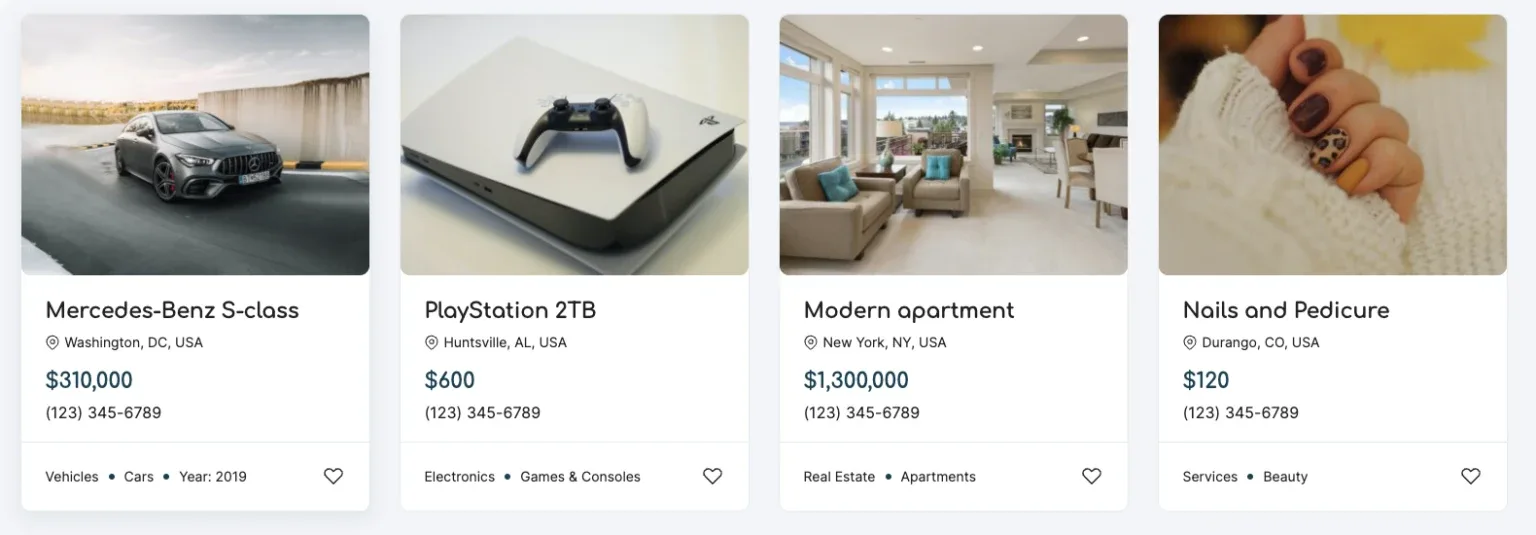
4
Check the edited file
After the change the file looks like this.
Ask the people who build Listivo
We answer by email from support@tangiblewp.com. With Premium Support, we also fix your site when something breaks.
We can also run your site for you, or build a new one.
Was this guide helpful?