Why you can’t change name files for XML sitemap?
Understand why the XML sitemap file for your Vehica listings is always named after the post type, why an SEO plugin cannot rename it, and what the option is if you write code yourself.
1 minute read
We are regularly asked whether the names of the XML sitemap files WordPress generates can be changed.
If you use Yoast SEO or a similar plugin
It is not possible. The plugin generates one sitemap file per existing post type automatically, and takes the file name from the post type.
For example:
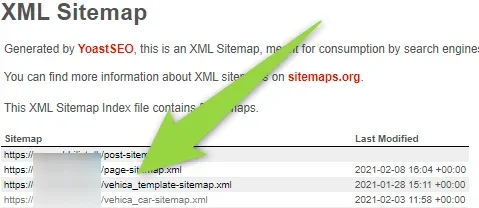
In Vehica the listing post type is called vehica_car, so its sitemap file is named vehica_car-sitemap.xml.
If you are a developer
Yoast publishes an example of how its sitemaps are built. You can use it as a starting point for your own sitemap generation on your website.
Ask the people who build Vehica
We answer by email from support@tangiblewp.com. With Premium Support, we also fix your site when something breaks.
We can also run your site for you, or build a new one.
Was this guide helpful?